You Can Buy Copilot Without a Microsoft 365 License. Here's What That Actually Means.
Intelligence
Malik Khan · · 11 min read
From 1 December 2026, new Microsoft 365 Copilot and Copilot Business offers can be purchased without a qualifying Microsoft 365 base subscription. That is a purchasing change, not a cheaper or complete Copilot. Here is what changes for buyers, and where identity, security, compliance and usage-based billing can still add cost.
From 1 December 2026, new Microsoft 365 Copilot and Microsoft 365 Copilot Business offers can be purchased without a qualifying Microsoft 365 base subscription. Microsoft has said so twice: to partners in the October 2026 Partner Center announcements, and to tenants in Message Center post MC1508148.
That sentence will travel fast in buying conversations. It sounds like Copilot just got cheaper and easier to try. The purchasing rule is changing. The product is not. Microsoft's own words are that this "affects how customers purchase Copilot, not the underlying Copilot capabilities," and that those capabilities "continue to depend on the Microsoft 365 apps and services a customer is licensed for."
Here is PointClick's plain-language read of what changes, what does not, and where the bill can still rise.
What is actually changing on 1 December
Microsoft is changing how Copilot is sold, not what the product can do.
From 16 October 2026, the current offers that require a qualifying Microsoft 365 base subscription were renamed "Microsoft 365 Copilot (add-on)" and "Microsoft 365 Copilot Business (add-on)." From 1 December, new offers can be bought without that qualifying base subscription. They have their own product and SKU IDs, and Microsoft says they are priced the same as the current offers. They will be available across all channels, including the Cloud Solution Provider (CSP) program, for commercial, education, government and nonprofit customers. The new offers replace the add-on offers for new purchases, and the add-on offers reach end of sale in CSP.
If you already hold Copilot, Microsoft says no action is required. Existing subscriptions keep their product and SKU IDs, pricing, renewal terms, auto-renew settings and service. You can still renew and adjust seat counts, and no migration is required. End of sale is not end of life.
MC1508148 adds that self-service purchase and end-user trials inside Microsoft 365 products remain available. That is a reason for IT and finance to watch who can buy Copilot once a base suite is no longer a checkout gate. Scripts or reports that match on the product name should already use product or SKU IDs. Time-limited CSP promotions, including 15% off standalone Copilot Business (1–300 seats, annual commitment and annual billing, for eligible customers) and 25% off Microsoft 365 Business Basic plus Copilot Business, run through 31 December 2026. Confirm eligibility and Promo IDs before you plan around them.
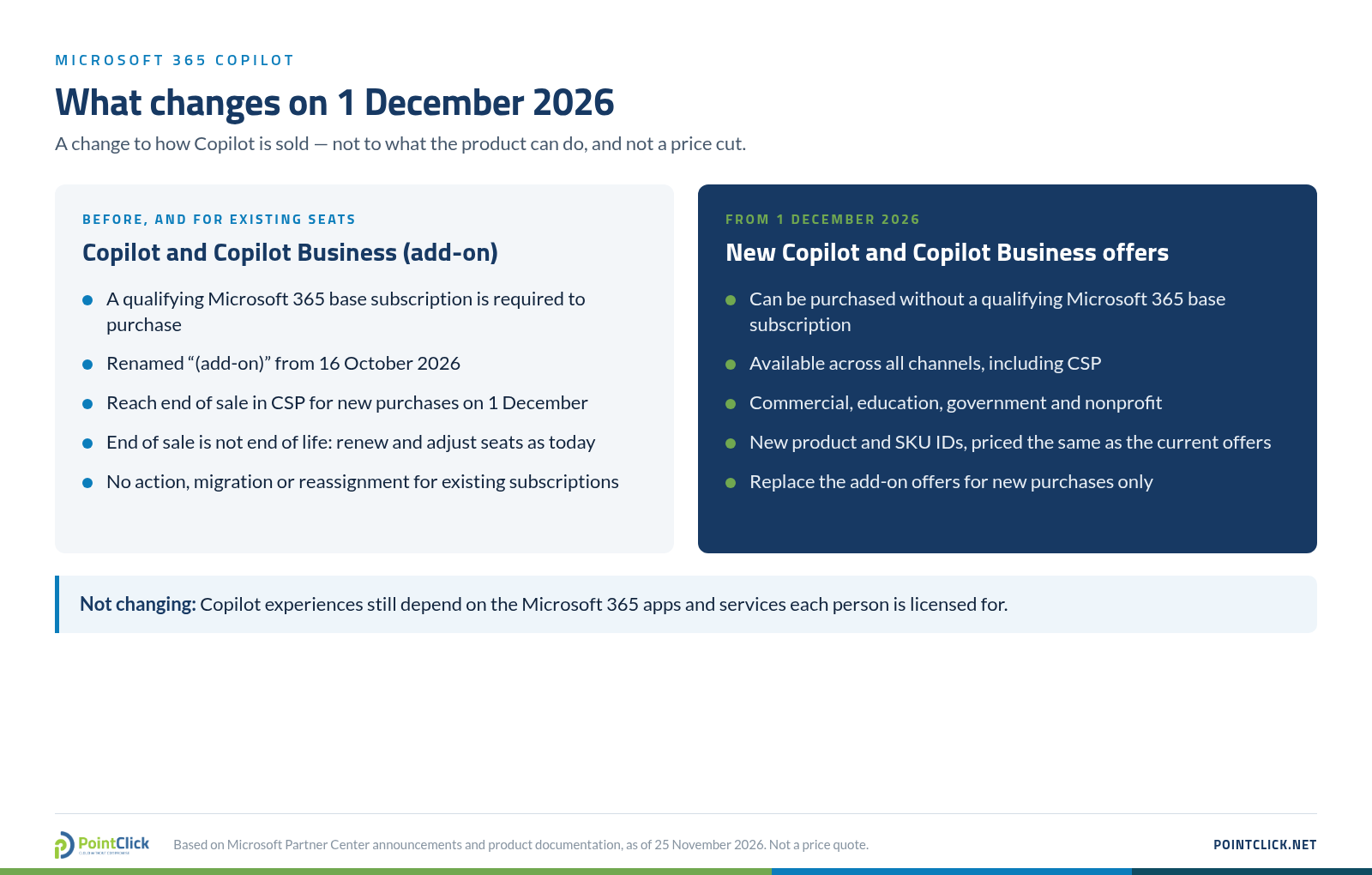
What changes on 1 December 2026: the purchase rule, not the product, and not a price cut.
What you can buy is not what you still need
Being allowed to buy Copilot without a Microsoft 365 suite is not the same as getting a full Copilot experience without Microsoft 365 apps, identity and data.
Microsoft's current Copilot requirements and license options pages, as of 25 November 2026, still say that users need a Microsoft Copilot license and a qualifying prerequisite license. They also still describe Copilot Business as an add-on for organizations with up to 300 users. Those pages may lag. Until the Product Terms say otherwise, treat 1 December as a checkout-rule change and confirm the terms when you buy.
Even if the purchase gate falls away, Copilot still needs a foundation to do useful work: a Microsoft Entra ID work or school account; an Exchange Online mailbox for email, calendar and meeting experiences; the relevant Microsoft 365 apps, with a Teams license for Copilot in Teams; and, for some features, OneDrive, plus transcription or recording for meeting- or call-grounded experiences. A Copilot seat with no mailbox, no files and no meetings has very little work data to ground on.
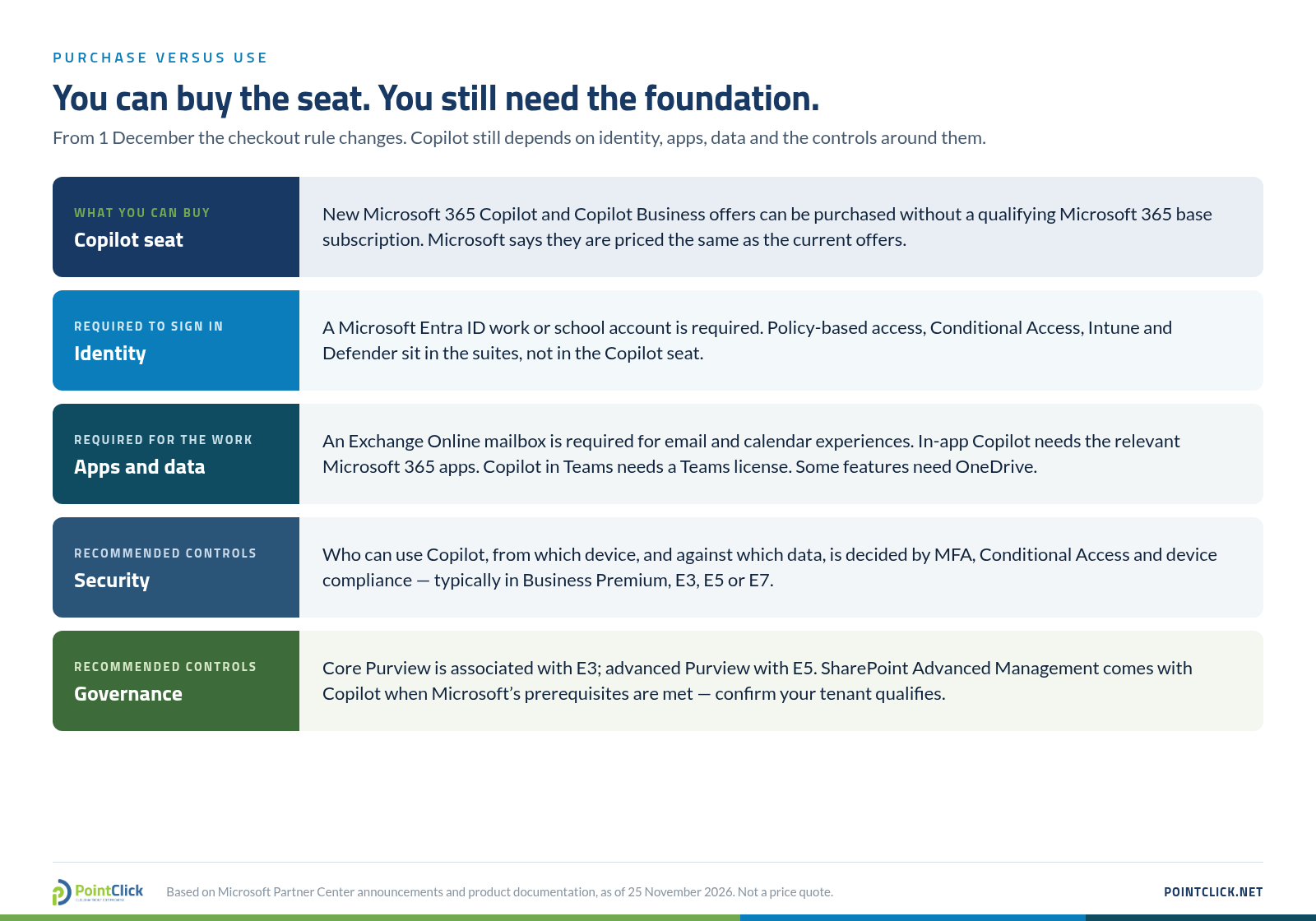
You can buy the seat without a base suite. You still need identity, apps, data and the controls around them.
Two dates, not one
The standalone purchase offers arrive on 1 December. Usage-based billing on by default does not.
Microsoft first planned to switch usage-based billing on by default for new Copilot Business purchases through CSP from 1 December 2026. On 3 November it moved that date to FY27 Q3, January to March 2027. When that default arrives, it will apply to new Copilot Business purchases in CSP, including standalone offers and bundles, and a new purchase will also turn the meter on for Copilot Business licenses already in the tenant.
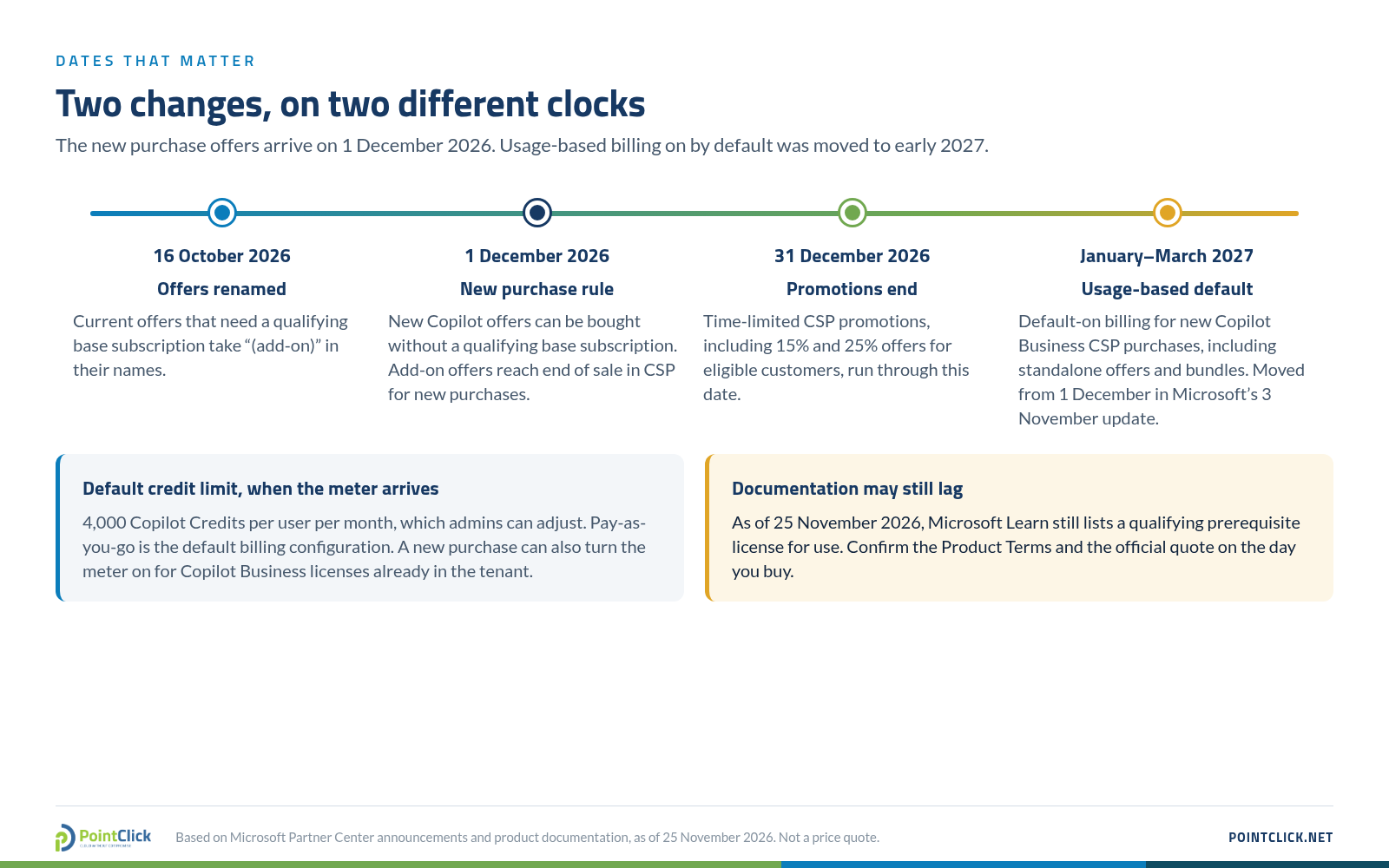
The new purchase offers arrive on 1 December. Usage-based billing on by default was moved to January–March 2027.
Where it quietly costs more
The list price of the Copilot offer is not what usually surprises people. The gaps around it are.
Identity and access do not come with the seat. Entra ID gets you a sign-in. Policy-based access, device management and threat protection sit in the Microsoft 365 suites. Microsoft's comparison is plain: E3 includes Entra ID P1; E5 adds Entra ID P2 and the fuller Defender XDR stack; E7 adds the Microsoft Entra Suite and agent security. On the business side, Microsoft's Copilot business plans still contrast "core" identity in Business Standard with "policy-based" identity, Intune, Defender and Purview in Business Premium. If you buy Copilot without a suite, ask what Conditional Access, device compliance, MFA, Intune and Defender the tenant already has. Two-factor authentication is the starting point, not the whole control set.
Security and data governance still live in Purview and the suite. Microsoft strongly recommends a secure and governed foundation. That is a risk prerequisite, not a purchase prerequisite. Copilot answers from the data a person can already access. If SharePoint, OneDrive and mail are overshared, Copilot will summarize the overshare faster than any search box did. Core Purview is associated with E3; advanced Purview with E5; and E7 extends those controls toward Copilot and agents. Purview can manage Copilot only where the tenant is licensed for those features. SharePoint Advanced Management is included when at least one Copilot license is assigned, but Microsoft's SAM prerequisites page still also lists a Microsoft 365 or Office 365 base subscription, so confirm that your tenant qualifies. Check oversharing before the first prompt — our AI Responsibility Scorecard is a practical place to start, and Employees Are Adopting AI Faster Than Organizations covers the owner, identity and audit questions that sit around agents.
Usage-based billing is a second, separate meter. Microsoft splits Copilot into everyday AI, covered by the per-user license, and advanced AI, billed in Copilot Credits. Chat, drafting and meeting summaries stay on the seat. Long-running agentic work — Copilot Cowork, Code, Autopilot, Work IQ APIs and newer agentic experiences — runs on usage-based billing. The announced default spending limit is 4,000 Copilot Credits per user per month, which admins can adjust. Pay-as-you-go is the default billing configuration. Disabling usage-based billing might limit access to some AI experiences. We walked through the meter in Copilot Is Getting a Meter. The Copilot Cost Helper lets you model seat count against a credit cap. Use the November dates when you budget, and decide who operates the meter after you turn it on.
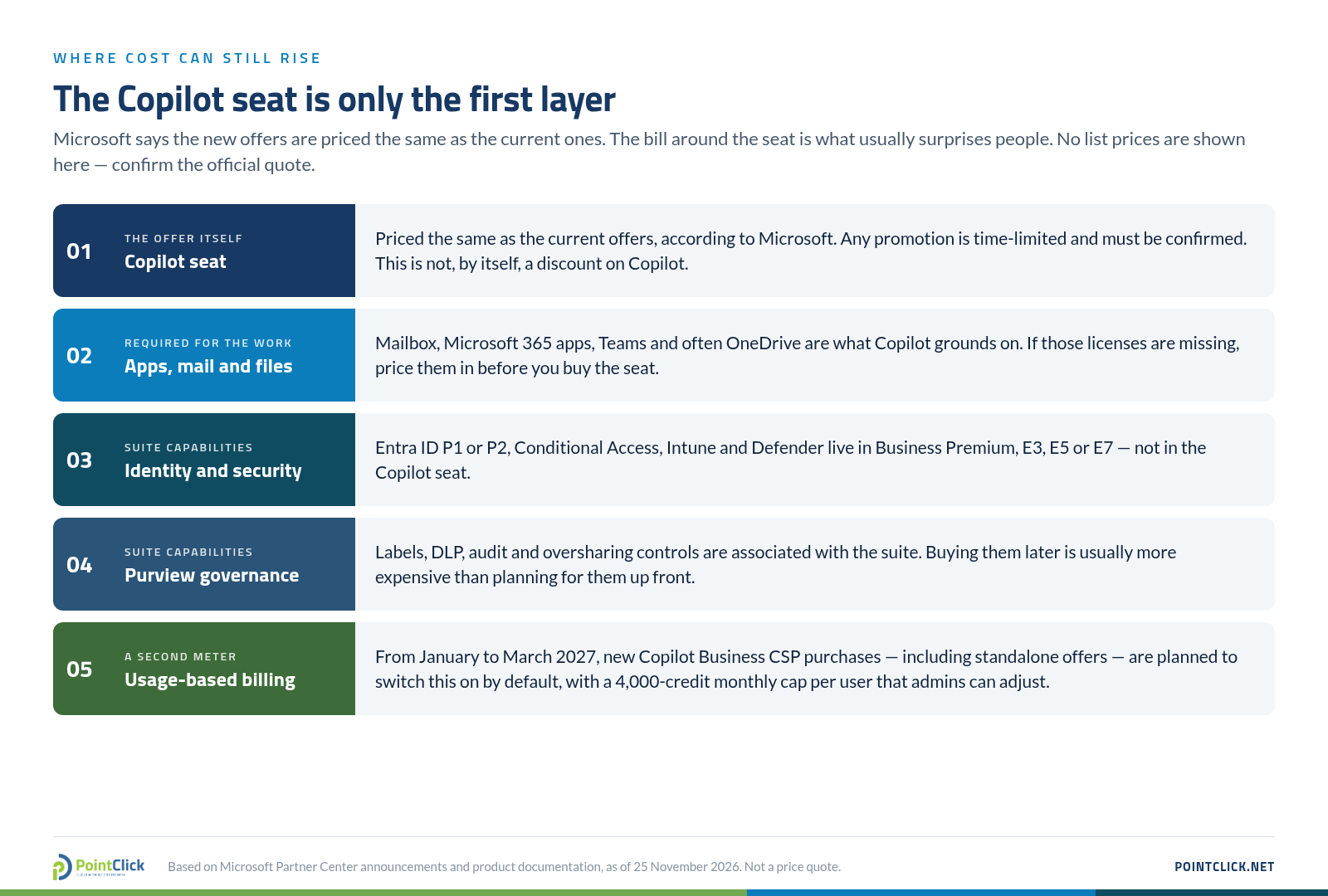
The Copilot seat is only the first layer. Confirm the official quote — no list prices are shown here.
Should you buy Copilot without the suite?
Sometimes yes. The new offers are useful when people already have Microsoft 365 or Office 365 apps, mail, files and Teams, and you want to add Copilot without being blocked at checkout. They can also make sense when a specific group is ready, the tenant already has Entra policies, and you would rather license the work than wait on a wider suite change.
They are a poor fit when the plan is "just buy Copilot" for users who do not have mailboxes, files, meetings, or any identity and data controls around them. You will pay for a license that cannot do the job, and you may still need the suite, Purview, Intune or Defender shortly afterward.
If you are reviewing the wider estate at the same time, start with our Microsoft 365 license optimization article, or run the numbers in the Microsoft 365 optimization tool. The cheaper-looking path is often the one that removes unused suites and assigns Copilot only to the roles that will use it.
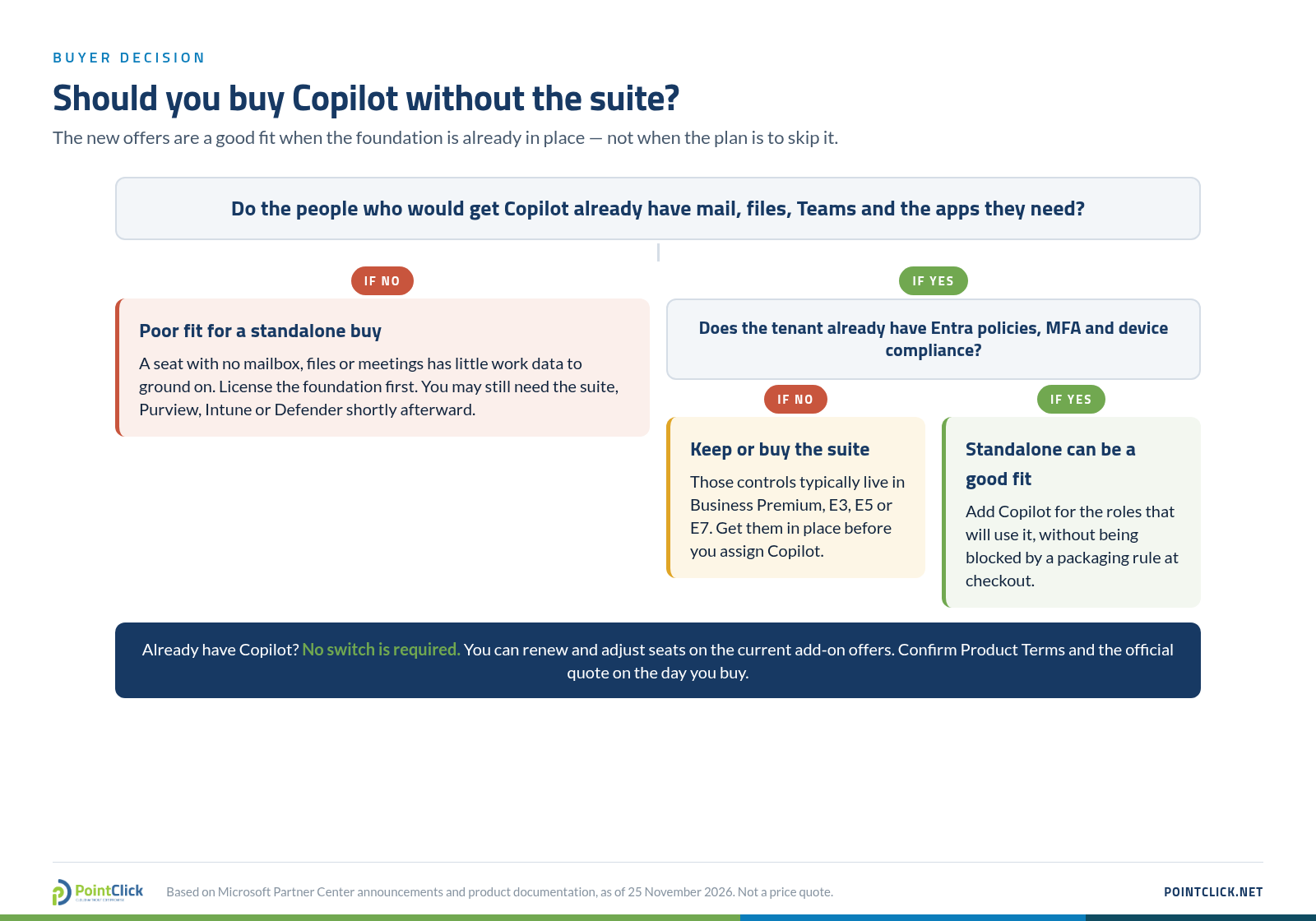
Standalone Copilot is a good fit when the foundation is already in place, not when the plan is to skip it.
What to confirm before you buy
Treat this as a packaging change, not a discount. Confirm the quote and the Product Terms on the day you buy — licensing pages and marketing SKUs are mid-transition.
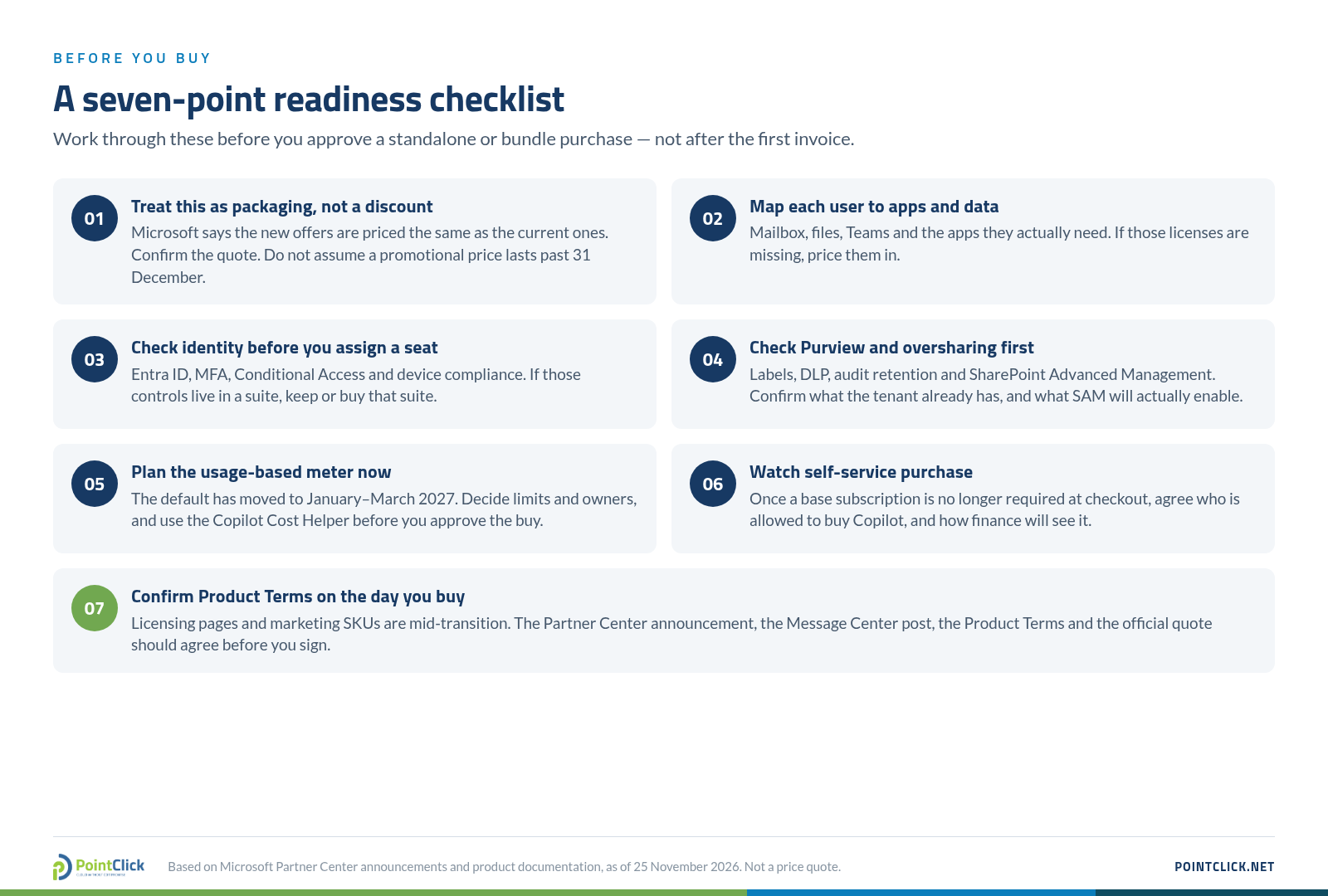
Work through this checklist before you approve a standalone or bundle purchase.
Frequently asked questions
Can I use Microsoft 365 Copilot with no Microsoft 365 license at all?
You will be able to purchase the new Copilot and Copilot Business offers without a qualifying Microsoft 365 base subscription from 1 December 2026. Microsoft still says Copilot experiences depend on the apps and services each person is licensed for, and its current licensing documentation still lists a qualifying prerequisite license for use. An Entra ID account is required, and an Exchange Online mailbox is required for email and calendar experiences. Confirm the Product Terms when you buy.
If I already have Copilot, do I need to switch to the new offer?
No. Microsoft says no action is required for existing subscriptions. You can renew and change seat counts on the current add-on offers. End of sale on 1 December applies to new add-on purchases in CSP, not to the licenses you already hold.
Does this make Copilot cheaper?
Microsoft says the new offers are priced the same as the current offers. Any saving comes from not buying a suite you were only purchasing as a checkout key — or from a time-limited promotion, which you should confirm. It is not a reduction in the Copilot price itself. Identity, apps, compliance tools and usage-based credits can still add cost.
Does the 1 December change turn on usage-based billing?
No. These are separate changes. The standalone purchase offers arrive on 1 December 2026. Usage-based billing on by default for new Copilot Business purchases through CSP is now planned for January to March 2027. When that default arrives, it will include standalone offers and bundles, with a default limit of 4,000 Copilot Credits per user per month.
Will SharePoint Advanced Management, Purview, Intune or Entra ID P1 come with a standalone Copilot license?
Not as a complete security and compliance stack. SharePoint Advanced Management is included with Copilot licensing when Microsoft's prerequisites are met, which is useful for oversharing and site governance. Core and advanced Purview, Intune, Defender and Entra ID P1 or P2 remain suite or add-on capabilities. Check what your tenant already includes before you assume those controls arrive with the Copilot seat.
Related reading
- Copilot Is Getting a Meter. Here's How to Budget for It.
- Copilot Cost Helper
- Microsoft 365 License Optimization
- Microsoft 365 optimization tool
- Employees Are Adopting AI Faster Than Organizations
- AI Responsibility Scorecard
- Who Operates Your AI After the Pilot?
- Agents Can Do the Heavy Lifting. Leaders Still Own the Outcome.
Talk to us before you buy
If you are deciding whether to add Copilot, keep a suite, or buy one of the new standalone offers, we will help you read the quote the way a buyer should: seats, prerequisites, identity and compliance gaps, and the credit meter that follows.
We are a Tier 1 Microsoft Cloud Solution Provider. We can review your current Microsoft 365 licenses, map Copilot to the people who will actually use it, and set spending limits before the default meter arrives.
Email us at info [at] pointclick [dot] net, or use our contact page. There is no obligation, and we will tell you if the suite you already have is the better path.
Malik Khan is Founder and CEO of PointClick Technologies, a managed IT and cloud services provider founded in 2007 with offices in Raleigh, Málaga, Banjul and India.
Microsoft 365 Copilot Copilot Business Microsoft 365 Licensing Microsoft CSP Entra ID Microsoft Purview Usage-Based Billing License Optimization