Your Employees Are Adopting AI Faster Than Your Company. Here's How to Catch Up Safely.
Intelligence
Malik Khan · · 6 min read
Your people are already using AI agents, often before you've approved them. Here's what we learned pausing our own rollout, what we see at our helpdesk, and a 90-day plan to say "yes, safely" instead of "no".
Somewhere in your organization, right now, an employee is connecting an AI agent to their work email.
They aren’t being reckless. They’re trying to ship faster, and that’s exactly the instinct you want. The problem is that the agent can read, draft and sometimes send on their behalf, across systems your security team spent years locking down. And in most companies, nobody in IT, legal or leadership knows it happened.
As a managed IT services provider for enterprise customers, we see this gap every week. Here’s what we’ve learned, including from our own mistakes, and a practical plan to close it without shutting the door.
The agents have arrived, and they’re aimed at individuals
In the last three months, the major AI labs have shipped always-on agents that work on your behalf: Meta’s Muse, which passed 10 million downloads in about 40 days; OpenAI’s dots; Anthropic’s Claude Duet, now in a US research preview; and SpaceXSI’s Grok Bot, included with SuperGrok and with Cursor’s Pro and Teams plans.
These aren’t chatbots you paste text into. They’re built to act, with connections to mailboxes, calendars, files and chat. Most are sold to individuals first, with enterprise controls arriving later.
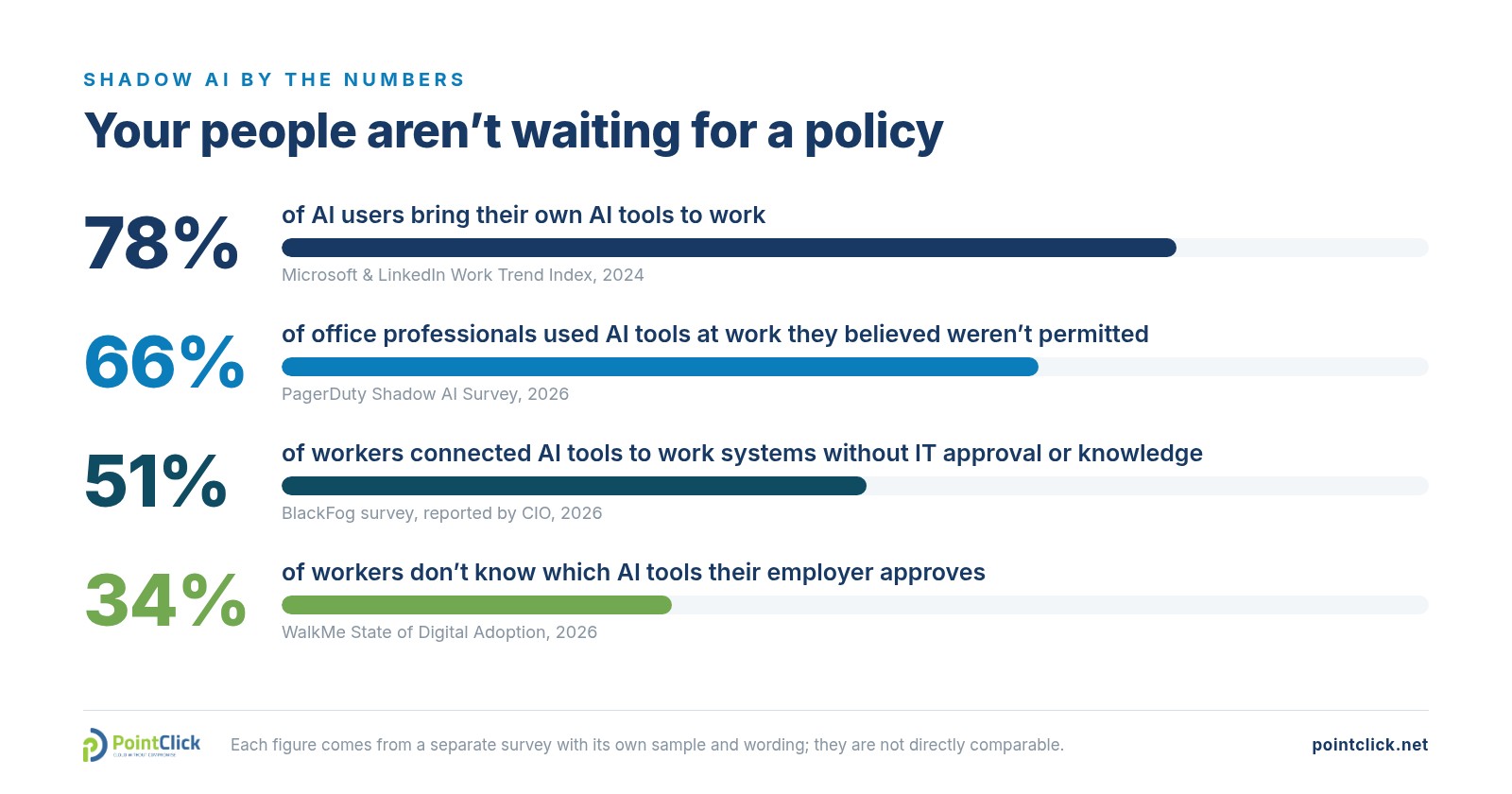
Sources: Microsoft and LinkedIn Work Trend Index, 2024; PagerDuty Shadow AI Survey, 2026; BlackFog survey, reported by CIO, 2026; WalkMe State of Digital Adoption, 2026. Separate surveys, not directly comparable.
The same PagerDuty survey found that 31% had shared financial information or confidential documents with public AI tools. But the number that matters most is the last one on the chart. A lot of shadow AI isn’t defiance. It’s the absence of clear direction.
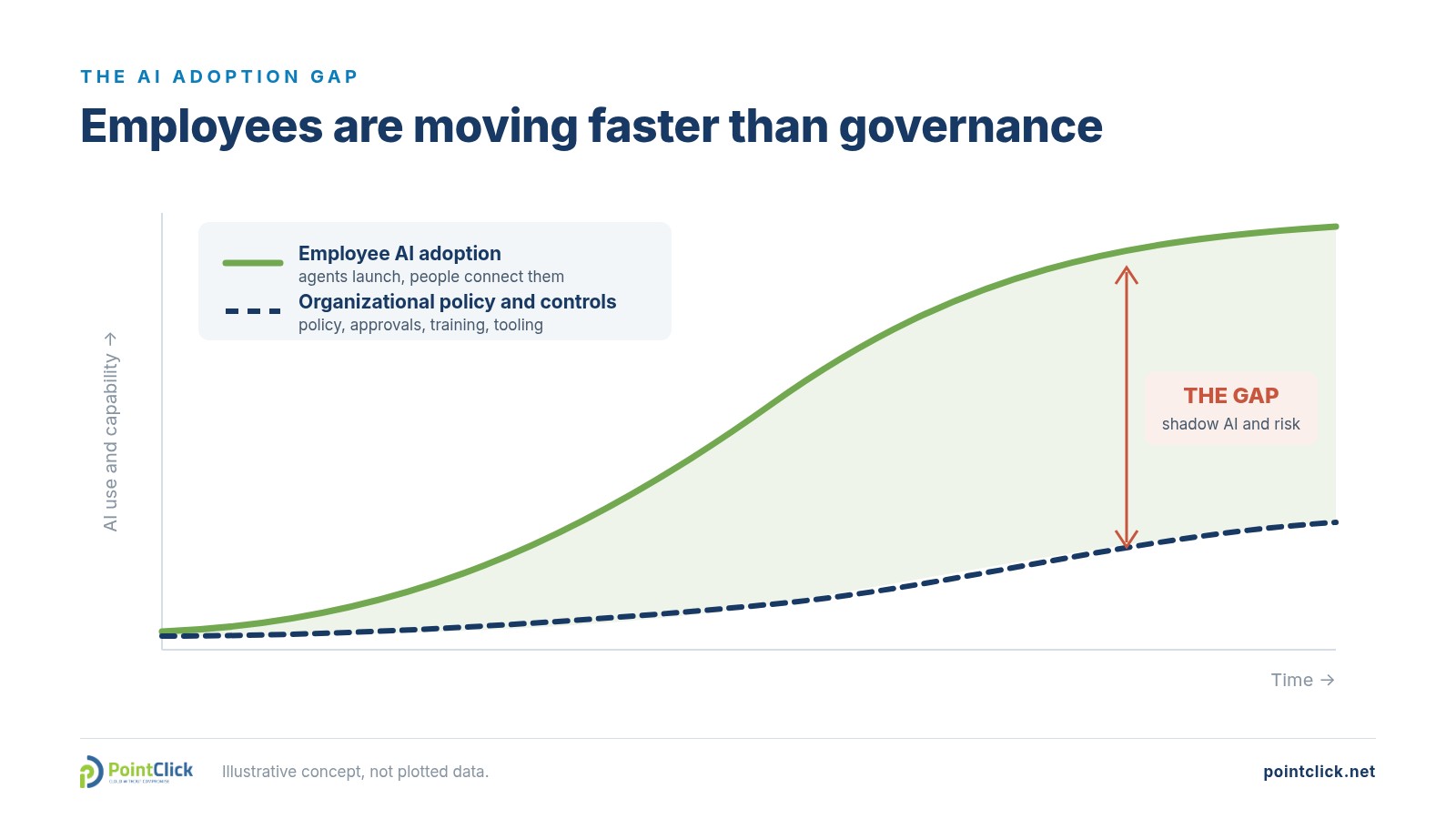
The adoption gap: the space between what your people use and what your policies cover. Illustrative concept, not plotted data.
We learned this the hard way
This topic is close to our hearts because we lived it.
When we started using Grok Bot at PointClick, adoption took off quickly. That was the good news. The bad news showed up a few weeks later: several team members were running their own agents in silos, each with their own connected apps and routines. We had little visibility into which agents existed, what they could reach or what guardrails were in place.
Nobody did anything wrong. But we couldn’t answer basic questions: Which agents touch client data? Who approved that connection? What happens when someone leaves?
So we did something that felt counterintuitive for a company that sells technology. We slowed the rollout to the rest of the team while we put controls in place.
Part of that work was choosing the right plan. Cursor’s Teams plans give you a shared workspace, SSO and central billing. But many of the governance controls sit on the Enterprise plan: SCIM provisioning, audit logs, a connector allowlist, network controls, and a record of what each agent actually did. Reading the security documentation against our own requirements made the trade-offs clear.
We’re still weighing Teams against Enterprise as I write this. The deciding question isn’t price. It’s how much visibility and control we need over agents that act on our behalf, especially the audit logs, the connector allowlist and the record of what each agent did. If you’re making the same call, start from your governance requirements, not the feature list.
The lesson: the platform decision is a governance decision. Ask “what can admins see and control?” before you ask “what can it do?”
What we’re seeing at the helpdesk
Lately, our helpdesk has been receiving a new kind of ticket. Employees at our customers ask us to help them connect AI agents, Muse among them, to their work accounts.
In most of those tenants, the request hits a wall by design. We’ve helped our customers lock down Microsoft 365 and Google Workspace so users can’t grant third-party apps access to company data on their own. Connecting an external agent needs management approval first.
So we route the request to the customer’s leadership. And in a number of cases, the answer is a flat no. We understand why: those companies have no internal policy to judge the request against, and without rules, “no” is the only safe answer.
But “no” is not a strategy.
Why a blanket “no” fails, and so does doing nothing
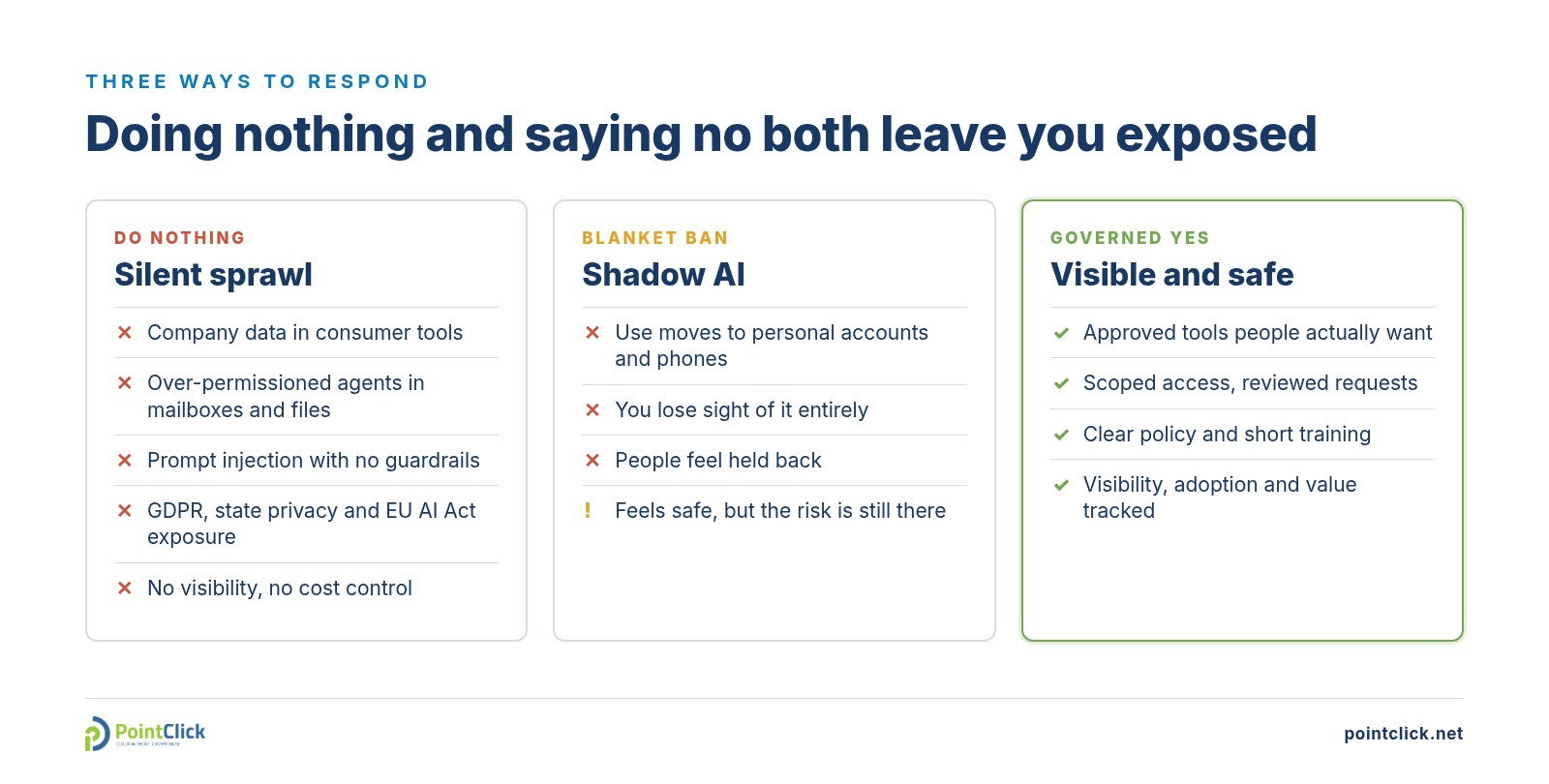
Two of these three options leave you exposed. Only one gives you visibility.
A ban without an alternative doesn’t stop AI use. It moves it to personal accounts and phones, where you can’t see it. PagerDuty found that 77% of office professionals feel their company’s AI restrictions limit their career growth, and 75% would likely look for a job with better AI skills development. Blocking everything costs you visibility and talent.
Doing nothing is still a decision. A single OAuth consent can let an agent read every message in a mailbox. Agents that read email and web pages can be manipulated by hidden instructions, which is why OWASP ranks prompt injection as the top risk for LLM applications. If you handle EU personal data, as we do from our Málaga office, GDPR applies, and the EU AI Act already expects deployers to support AI literacy among staff, with high-risk rules phasing in over the next two years.
The goal isn’t to stop AI. It’s to make the safe path the easy path.
A practical framework: approved, conditional, prohibited
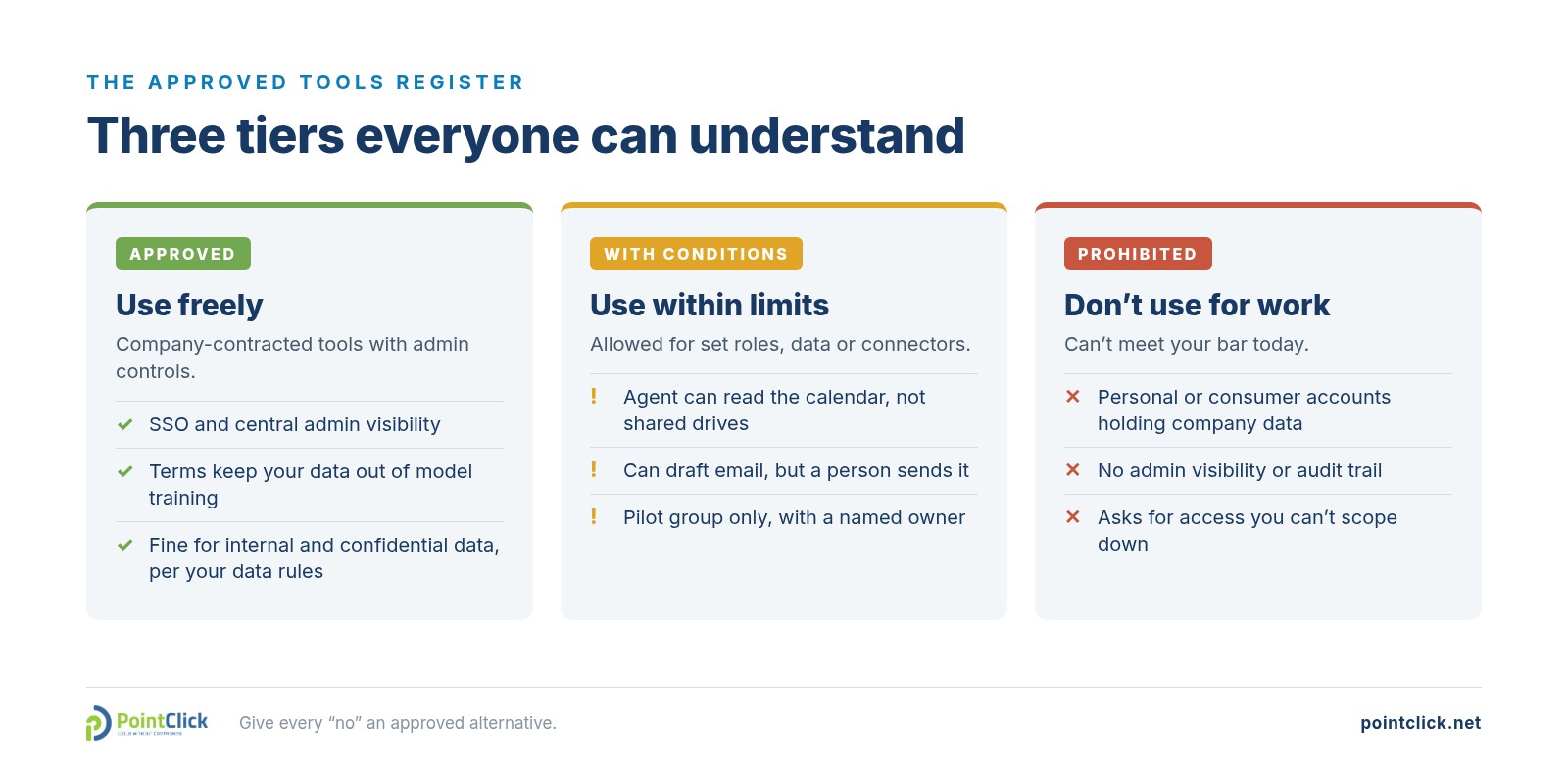
Publish the register where people work, and give every “no” an approved alternative.
Your first 90 days
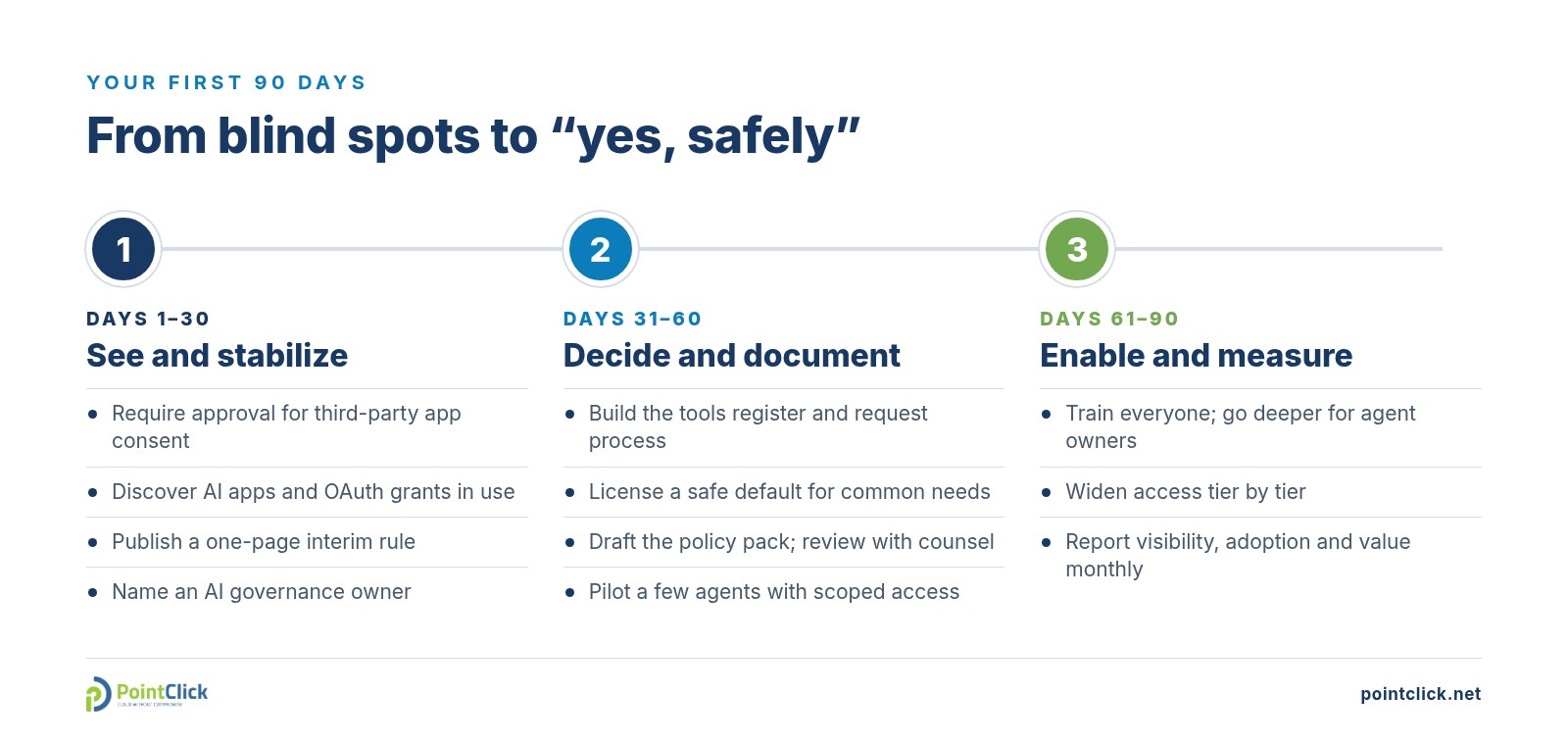
Start with visibility, then decisions, then enablement.
The first step matters most: turn off user consent to unverified third-party apps and route requests through an approval workflow. Then make sure people have a safe, licensed option for their most common needs before you widen the rules.
The controls are already in the tools you pay for
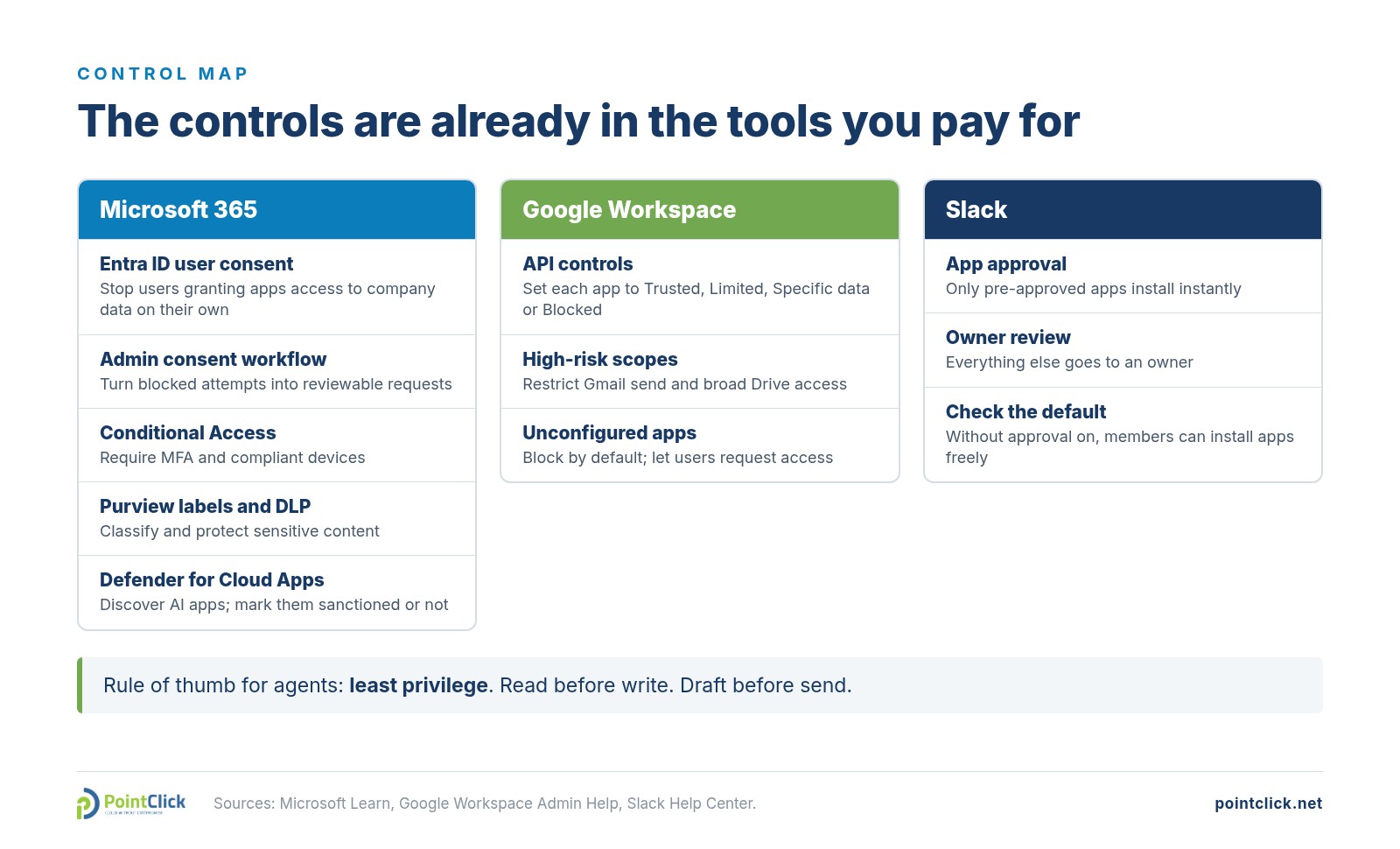
Sources: Microsoft Learn (user consent, admin consent workflow, Conditional Access, sensitivity labels, DLP, AI app discovery); Google Workspace Admin Help; Slack Help Center.
Two settings deserve a check this week. In Microsoft Entra ID, the admin consent workflow turns a dead end into a reviewable request. In Slack, app approval is off by default, so members can install apps freely until you turn it on.
The policy pack
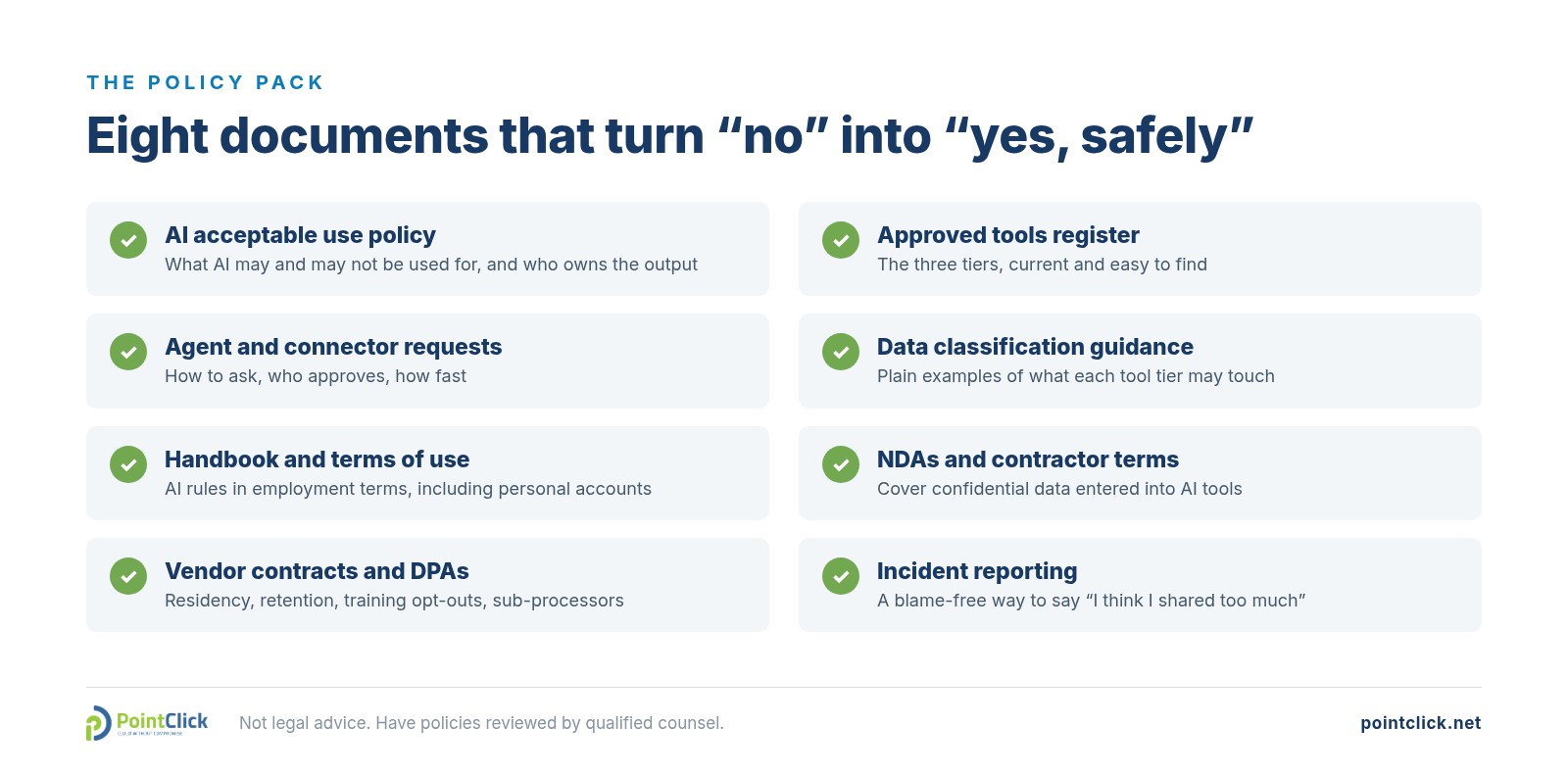
Technology controls need rules people can read.
Our free Policy Generator can give you a working first draft of several of these in minutes.
This article isn’t legal advice. Have your policies reviewed by qualified counsel for your jurisdictions.
Education beats enforcement, and measurement keeps you honest
Most people who leak data into AI tools don’t know they’re doing it. Keep training short, practical and repeated: what counts as confidential in your business, how agents differ from chatbots, why an agent should never act on instructions found inside an email or web page, and never sharing passwords, codes or API keys with an AI tool.
Then track three things every month:
- Visibility: AI apps discovered, OAuth grants reviewed, and the share of AI use in approved tools.
- Adoption: active users of approved tools and request turnaround. A slow approval process creates shadow AI.
- Value: hours saved and cost per task, compared with the work actually delivered.
Before you scale any agent workflow, run it through our free AI Responsibility Scorecard. For a broader view of your security posture, try our NIST CSF assessment.
Key takeaways
- Your employees are already using AI agents. The question is whether you can see and shape it.
- Blanket bans push AI use into personal accounts and cost you visibility and talent.
- Use three tiers and give every “no” an alternative.
- Turn on consent and approval controls before the next agent launch.
- Pair a short policy pack with practical training, and measure what changes.
Let’s close the gap together
Since 2007, PointClick has helped organizations adopt new technology without losing control of it. Today we support customers from our offices in Raleigh, Málaga, Banjul and India.
Start with two free tools: - AI Readiness Assessment shows where your organization stands today. - Policy Generator drafts the policies you need next.
When you’re ready to put the controls in place, talk to our team about AI governance for your Microsoft 365 or Google Workspace tenant. We’ll help you say “yes, safely” to the tools your people want to use. See how we run AI for clients through Managed Intelligence.
AI governance shadow AI AI agents Microsoft 365 Google Workspace AI policy cybersecurity