Building Your AI Agent Office
Intelligence
Malik Khan · · 9 min read
How to organize a team of AI agents by role, connect them to your tools safely, see their work in one dashboard, and keep people in charge of every decision that matters.
In a growing business, the founder, owner or department head becomes the bottleneck. Every reply, invoice question, contract and release waits on one desk. More tools don't fix that. What helps is delegation you can trust, with rules.
Download the PDF — 17 pages, free, no email or form required.
What an AI agent office is
It has two parts. First, a team of AI agents on an agent platform. Each agent has one job, its own instructions and only the tool access that job needs. Second, a private dashboard, such as office.example.com, that shows the team like an office building, with one floor per department or product squad.
Agents post a one-line status as they work. When an agent needs a decision, it appears in a Waiting room with a clear question and answer buttons. The approver sees the whole operation at a glance and clears decisions in one click.
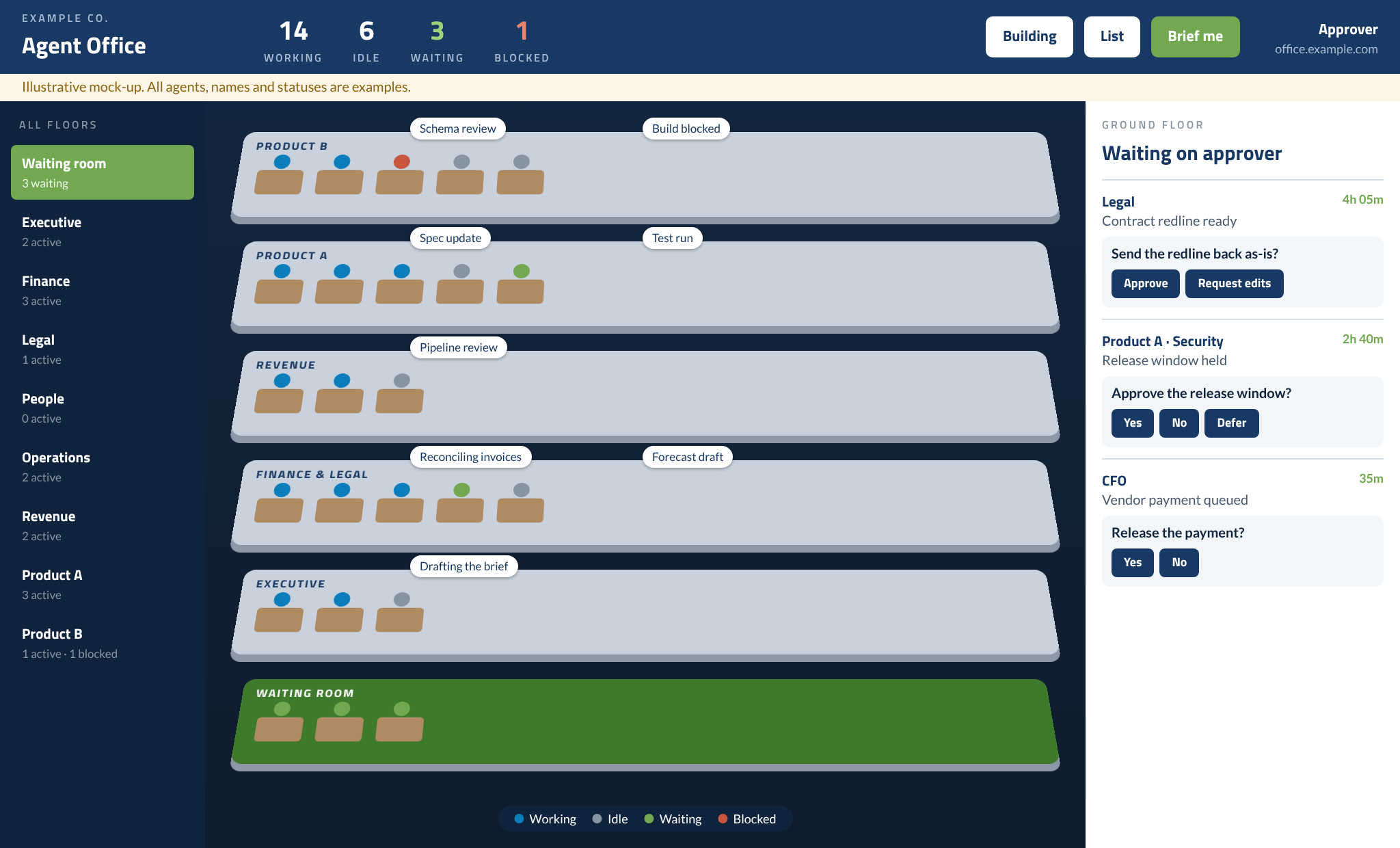
An illustrative dashboard. All names and data are examples.
What it gives back
This isn't about replacing people. It's about removing the drag between deciding something and getting it done, without giving up control.
- Time back. Routine reading, sorting, summarizing and first drafts happen before the leader looks.
- Consistency. Every agent works from the same handbook and hard rules.
- An audit trail. Each decision records who made it and when.
- Faster follow-through. Long waits are flagged, so nothing goes quiet.
- Room to scale. Adding a product means adding a squad with known roles, not reinventing the process.
- Control stays with people. Agents draft. Approvers approve. Nothing goes out, no money moves, and no agent can approve on anyone's behalf.
Delegate the work, not the judgment
Every design choice follows from that one line. Agents can prepare almost anything. Anything that leaves the company, spends money or makes a commitment waits for a human “yes.”
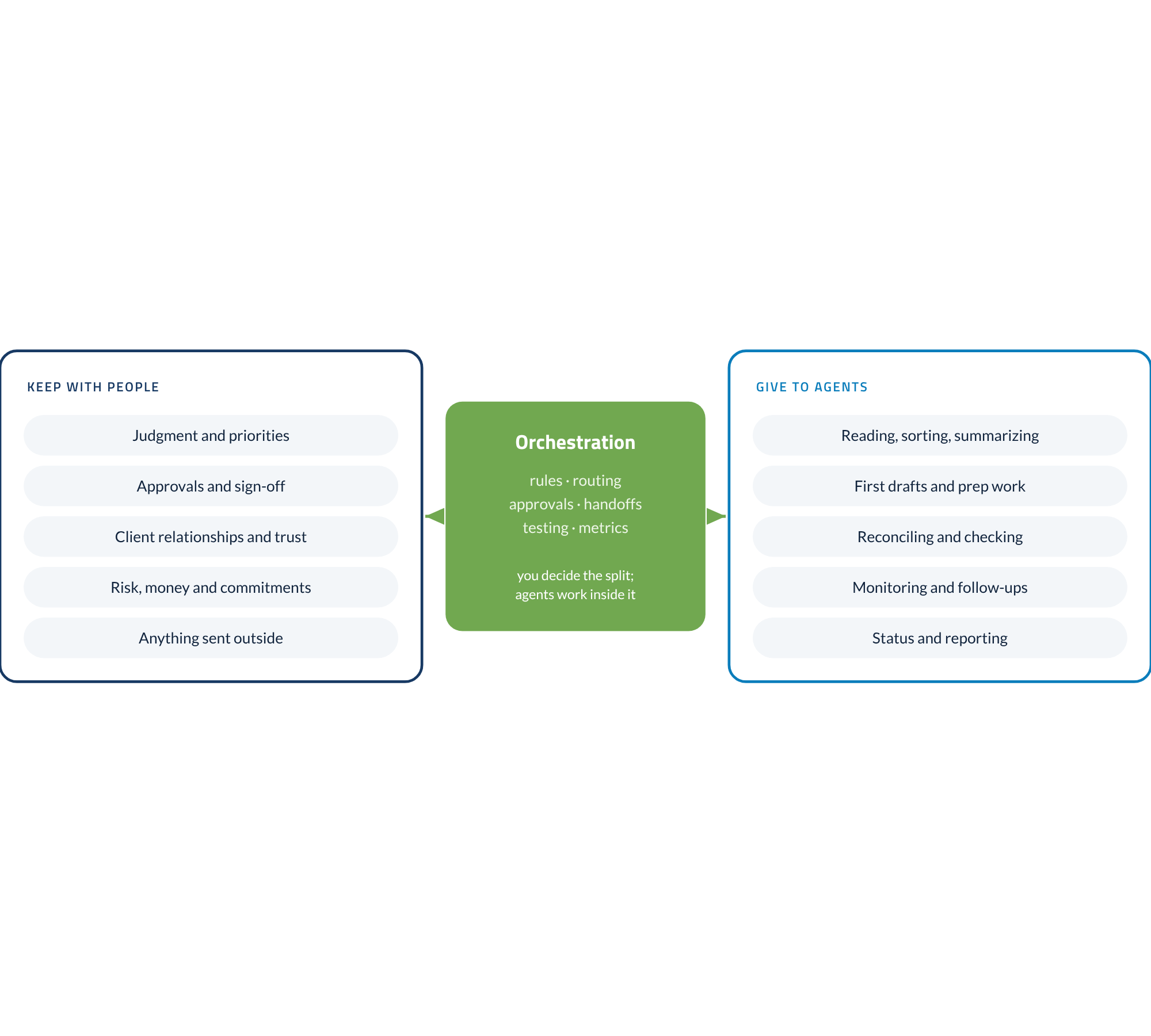
You decide the split. Agents work inside it.
A useful way to picture the job: be air traffic control, not the pilot. Routing rules, the Waiting room and approval gates make sure work takes off, lands and hands over without colliding.
Useful for any leader, at any scale
The pattern works for one person running a whole business and for one department inside a much larger company.
- Solo founders start with an executive assistant and a finance helper, and win back evenings before adding anything else.
- Small business owners add role-based agents for work that repeats: bookkeeping, scheduling, proposals and follow-ups.
- Department heads in marketing, operations, finance, sales or IT can run an agent team within the guardrails IT and security already set.
Inside a larger company, use the company's own identity provider, approved connectors and data policies. Get IT and security sign-off before the first agent touches real data.
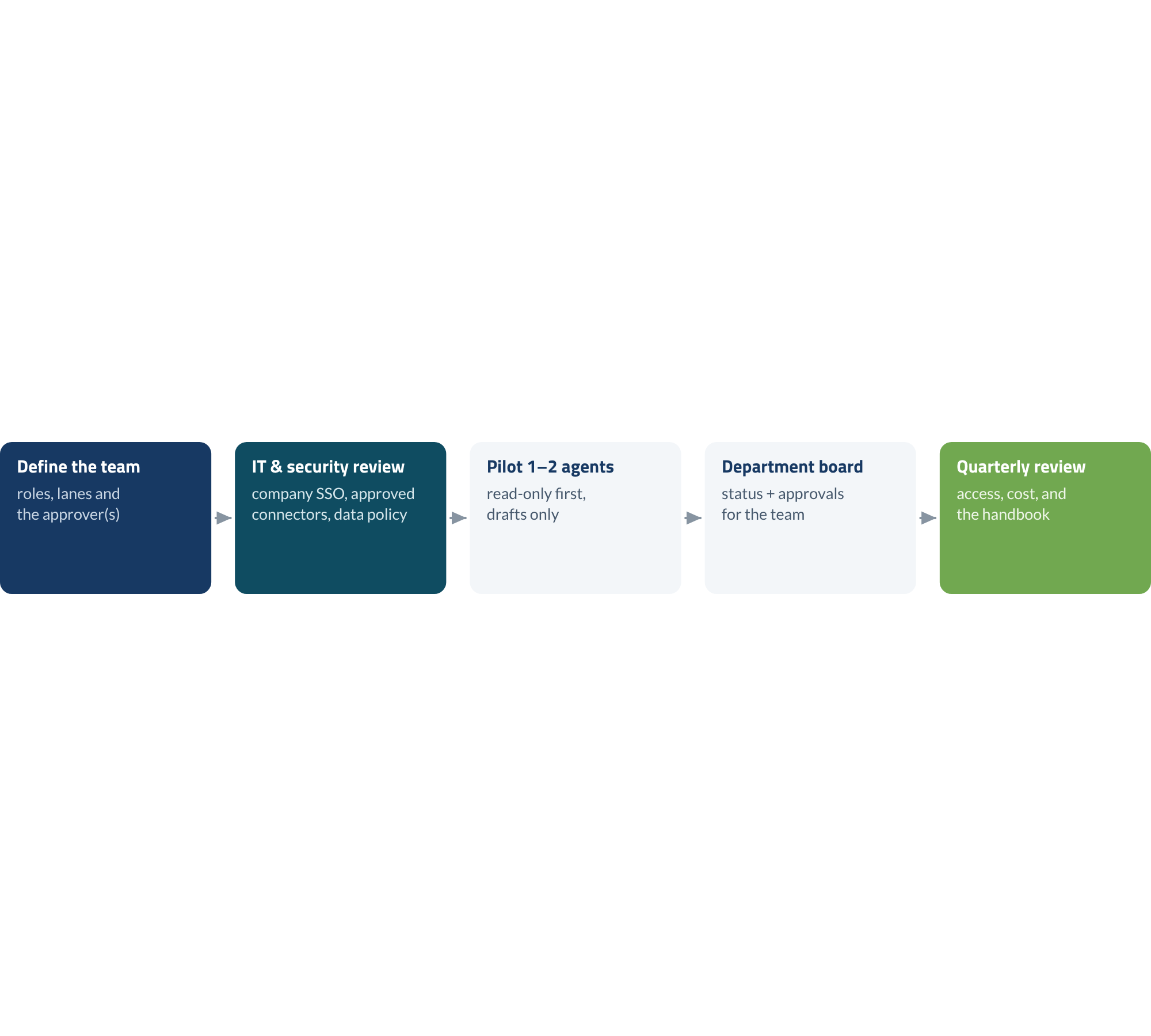
Start read-only, with drafts only, and get IT and security sign-off first.
An org chart, not a chatbot
Each agent is set up like a role on a real team, with a job description, a lane, its tools, and the roles it hands work to. This example shows a company-wide office with business functions and product build squads.
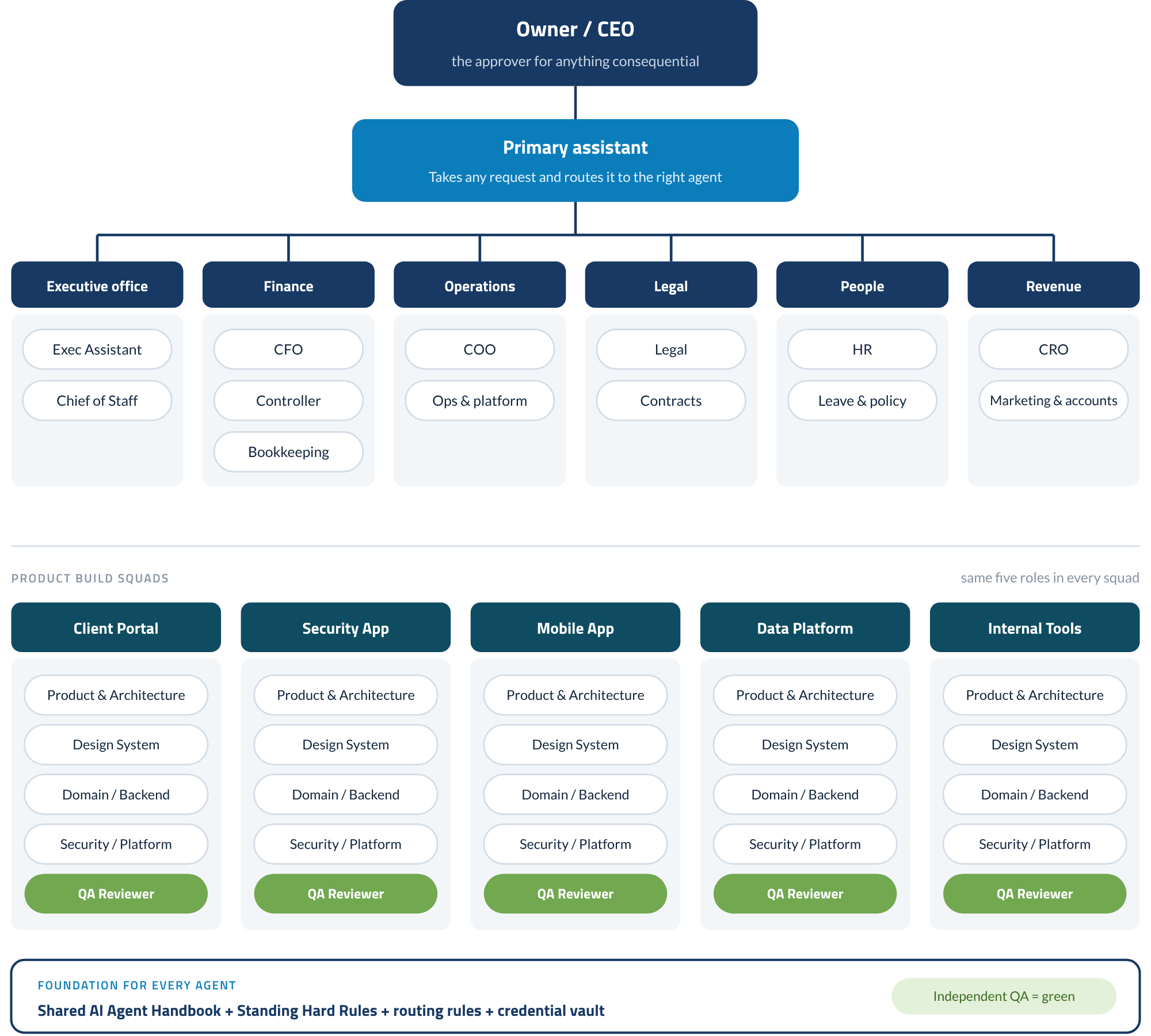
Every product squad repeats the same five roles so the checks stay consistent. An independent QA Reviewer, which never writes the code it checks, signs off before anything reaches the approver for release.
How the pieces fit together
Three layers: the approver, the agent team with its connected tools, and the dashboard, which gives one secure place to see status and make decisions.
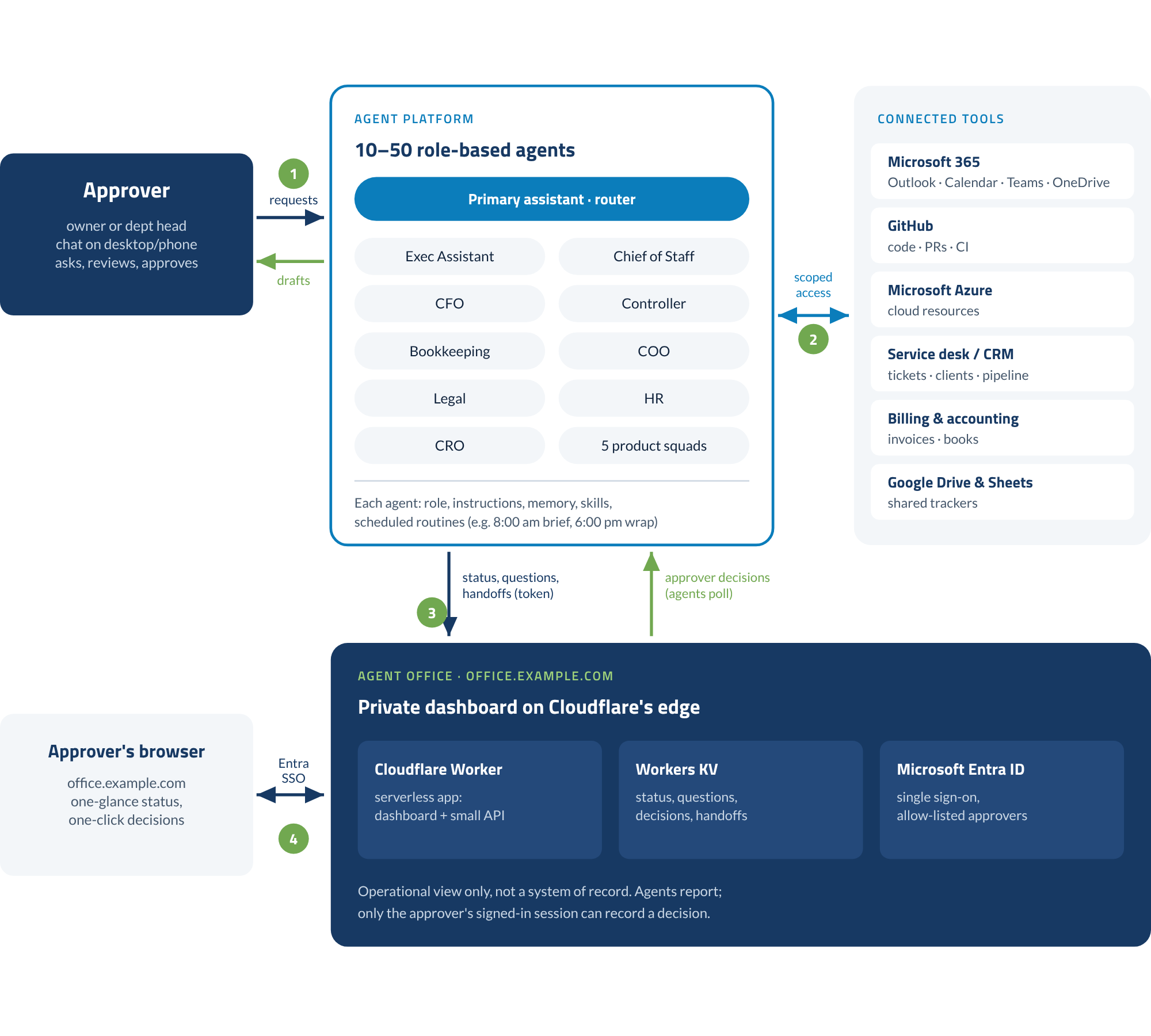
The approver messages the primary assistant like a colleague. Each agent only gets the connectors its role needs. Over HTTPS, agents post a short status and any question for the approver, using a dedicated report-only credential. The dashboard sends visitors to Microsoft Entra ID sign-in first. Only named approvers are on the allow-list.
The toolkit
Nothing exotic. Most of it is the stack a modern business already pays for, plus an agent platform and a lightweight dashboard.
| Category | What it's for | Typical users |
|---|---|---|
| Agent platform | Hosts the agents. Each has its own role, instructions, memory, skills and scheduled routines. Look for a built-in credential vault, so logins never pass through chat. | Every agent |
| Email and calendar | Inbox triage, morning and close-of-day briefs, reply drafts and scheduling (for example Microsoft 365) | Executive Assistant, Chief of Staff |
| Chat and file storage | Internal messages, shared files and documents (for example Teams, OneDrive, Google Drive) | Business-function agents |
| Code repository and CI | Code, pull requests, issues and builds for each product (for example GitHub) | Product build squads |
| Cloud platform | Cloud resources, cost and diagnostics (for example Microsoft Azure) | Security / Platform, COO |
| Service desk / CRM | Tickets, client records, pipeline and renewals | COO, CRO, account agents |
| Billing and accounting | Subscriptions, invoices, provisioning and the books of record | Operations, Finance, Controller |
| Status dashboard | Live status, the Waiting room, decisions and handoffs | Approvers; all agents report to it |
This exact stack isn't required. What matters is the pattern: role-based agents, scoped tool access, one secure place to see status, and a human approval step before anything consequential. Most agent platforms now connect to business apps through open standards such as the Model Context Protocol (MCP), so the same approach works with the tools already in place.
Secure by default, approvals by design
The office has two kinds of visitors: people and agents. They get completely different credentials, and only people can make a decision.
- Single sign-on with Microsoft Entra ID. OpenID Connect (authorization code with PKCE) against a single tenant, allow-listed to named approvers.
- Signed, short-lived sessions. A signed, HttpOnly, Secure cookie that expires after 12 hours.
- A separate, report-only agent credential. Agents can post status and read decisions. They cannot create an approval.
- Least privilege everywhere. Each agent only connects the tools its role needs. The office stores one-line summaries, never client names, personal data or secrets.
- Secrets in a vault, not in chat. Agents never ask for passwords or one-time codes in chat.
- An audit trail. Every decision records who decided and when.
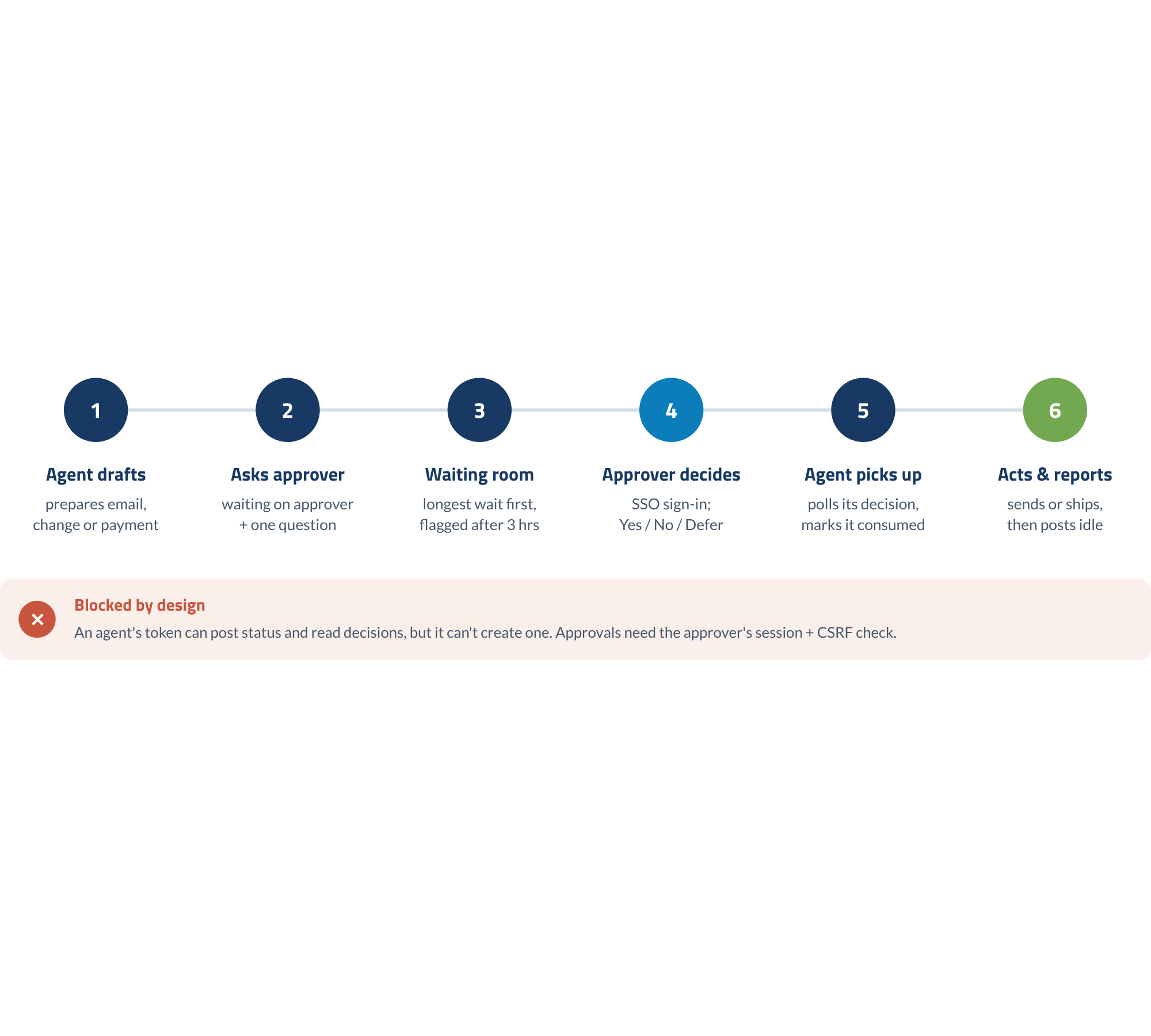
An agent's token can post status and read decisions, but it can't create one.
A small, serverless dashboard
The reference dashboard is one small serverless app on Cloudflare's global edge network. There are no servers, containers or databases to patch. A custom domain (for example office.example.com) is attached over HTTPS, with SSO first.
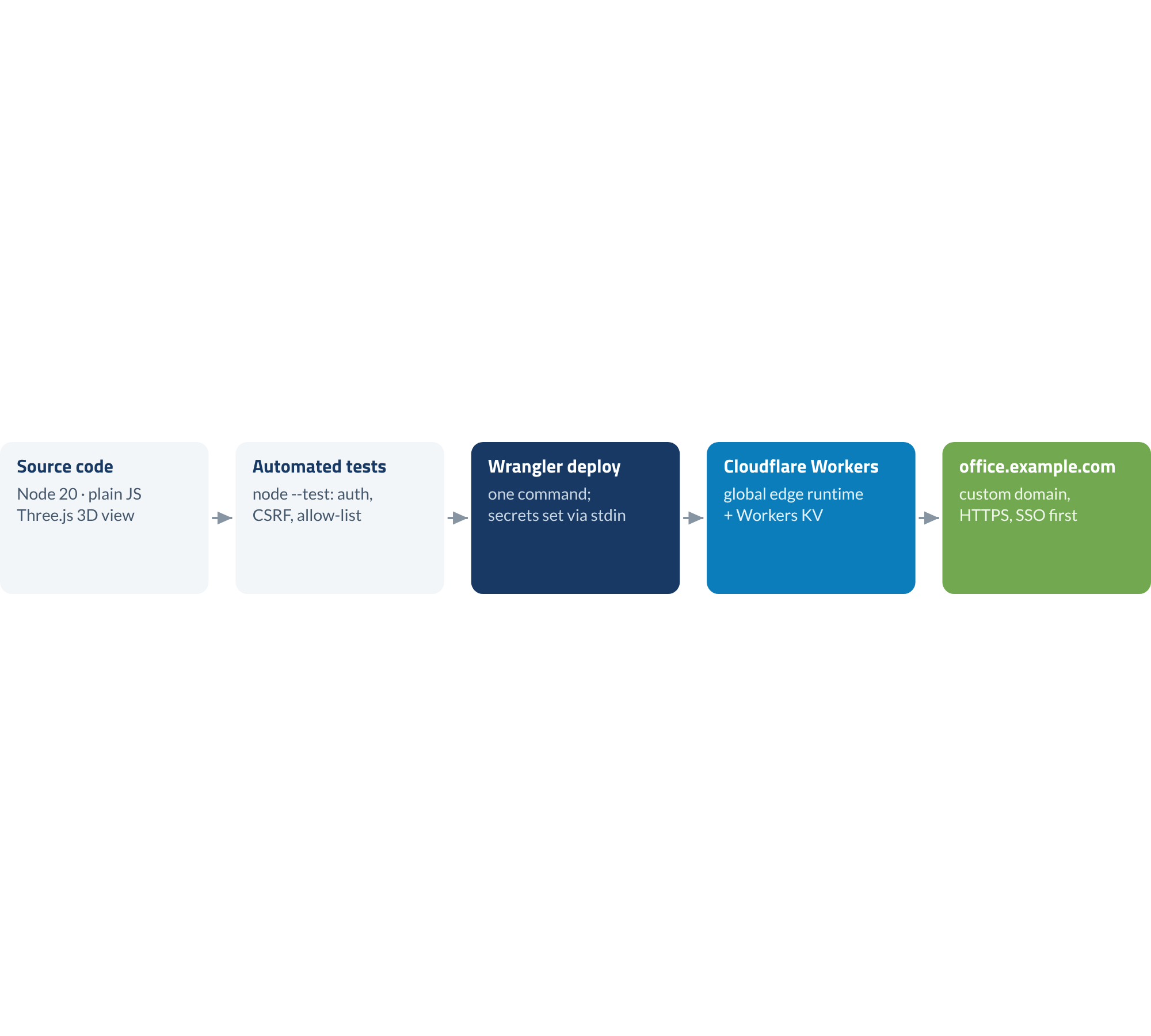
What an agent reports is one short line (280 characters max), plus a question with 2–8 answer options when it needs a decision. No secrets, client names or personal data, ever.
Three everyday workflows
The same guardrails apply to each: agents draft, approvers decide, and the dashboard shows where things stand.
A. Morning brief (and the 6:00 pm close of day)
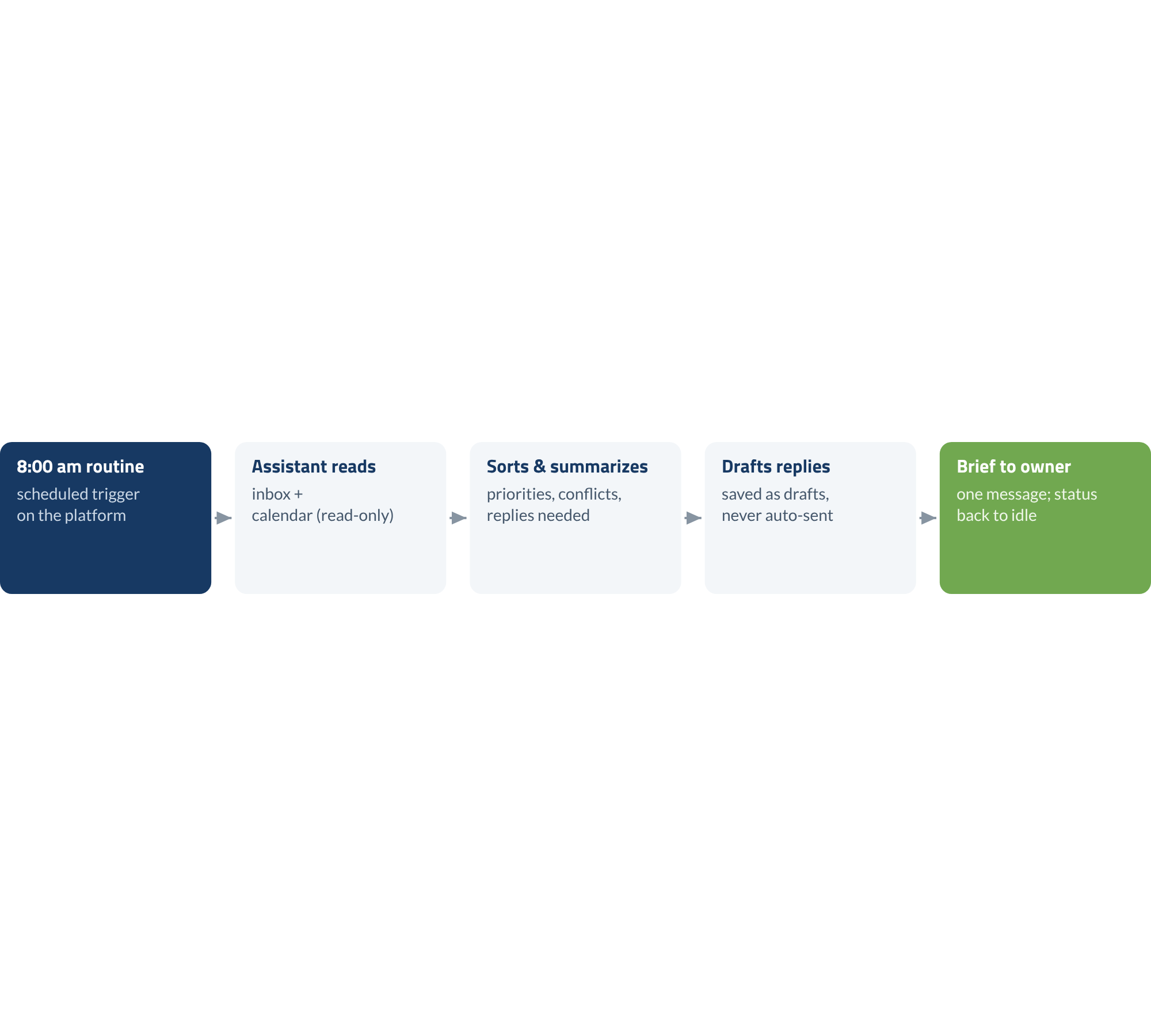
The 6:00 pm close of day follows the same pattern: what got done, what's still open and what needs a decision tomorrow.
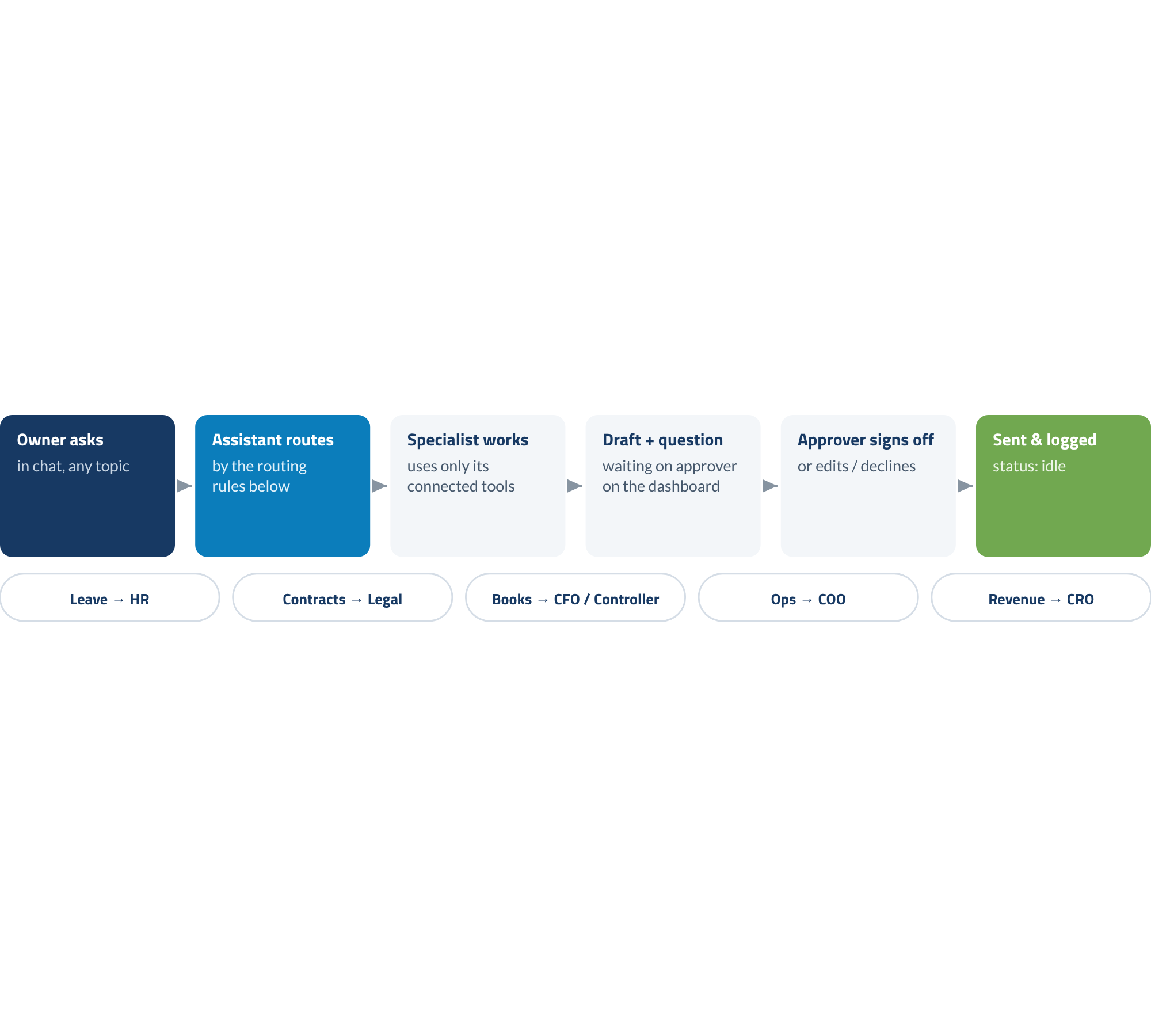
B. Request, routing, approval, send
C. Handoffs between agents
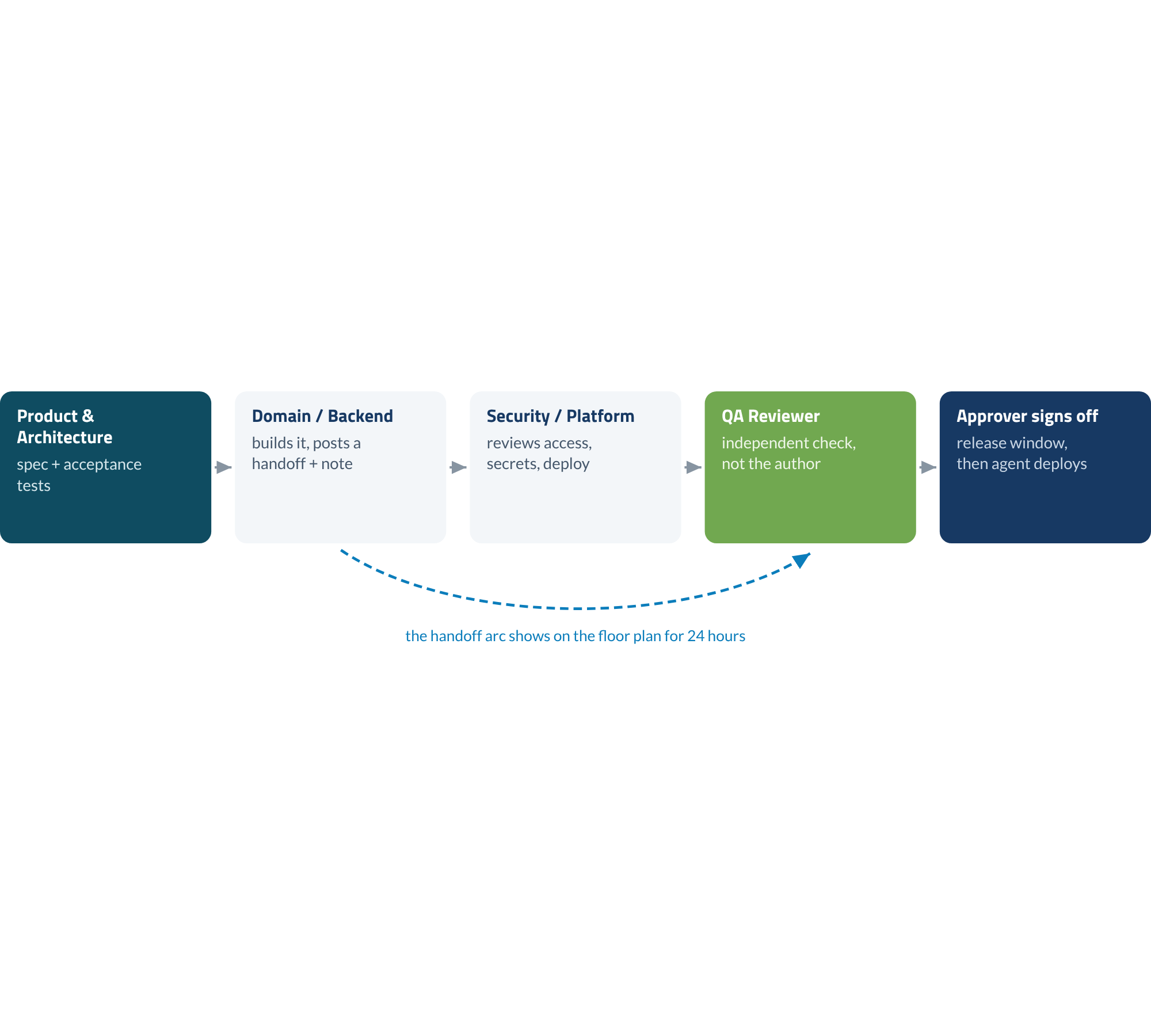
Handoffs go both ways. If a handoff stalls, the dashboard shows who has the work and for how long. Waits over three hours are flagged, and statuses with no update for a day show as stale.
The rules every agent follows
Every agent shares one AI Agent Handbook and a short list of Standing Hard Rules. The rules aren't suggestions. They're written into every agent's instructions.
- Draft-first. Nothing is sent outside the company without an approver's explicit OK.
- No money moves without explicit instruction from the owner or an approver.
- No secrets in chat. Agents never ask for, handle or repeat passwords, one-time codes or keys.
- Agents can't approve on anyone's behalf. Only an approver's signed-in session can record a decision.
- Stay in your lane. Work outside an agent's role gets routed, not improvised.
- Ask, don't assume. When unsure, stop and ask one clear question with options.
- Keep it clean. Status lines and logs never include client names, personal data or credentials.
Agents draft. People decide. Zero external sends, payments or approvals without a human “yes.”
| Topic | Goes to |
|---|---|
| Leave, hiring, policy | HR |
| Contracts, redlines | Legal |
| Books, invoices, payments | CFO / Controller |
| Operations, service delivery | COO |
| Pipeline, pricing, renewals | CRO |
| Inbox, calendar, briefs | Executive Assistant |
| Cross-team priorities | Chief of Staff |
How to keep it secure as it grows
Security isn't a one-time setup.
- Put SSO with MFA in front of any dashboard, and allow-list named people.
- Grant each agent only the connectors its role needs. Start read-only.
- Keep logins and API keys in a vault. Never put them in prompts, chat, code or status messages.
- Gate external sends, money, contracts and production changes behind a human approval. Tokens shouldn't be able to approve.
- Keep audit logs of who decided what and when.
- Review connector access every month or quarter. Disconnect retired agents.
- Rotate API tokens, app secrets and session keys on a schedule, and right away if one might be exposed.
- Use a separate QA agent. The agent that builds or drafts shouldn't be the one that signs off.
Never share secrets in chat, not even with your own agents. If an agent ever asks for a password or one-time code, treat it as a bug in its instructions and fix the instructions.
A starter plan
Nobody needs fifty agents on day one. Start with one, write the rules first and grow from there.
- Write the rules first. Draft a one-page handbook with the hard rules and the routing table.
- Start with an executive assistant. Connect email and calendar, read-only at first. Tune it for two weeks.
- Add drafting, not sending. Let the assistant save replies as drafts. A person reviews and sends.
- Add roles where work repeats. Map one slow, many-step process and automate its slowest piece first.
- Lock down access. Use a vault, SSO with MFA, and least-privilege connectors.
- Give the team a status board. Even a shared list works.
- Add reviewers before adding builders. Pair builders with an independent QA reviewer.
- Review monthly. Check access, rotate tokens, review usage and cost, and retire agents that don't pull their weight.
Copy, paste, customize
Paste this into an AI assistant or agent platform to design a role-based agent office with the same guardrails. Fill in the bracketed parts first. The full prompt is also in the PDF guide.
Act as an agent-office architect. Help [name], [title] at [company] set up a role-based "Agent Office": a team of AI agents that each run one part of the business under clear guardrails. Work step by step, and ask before assuming.

CONTEXT
- What the business does: [services/products, team size, locations]
- Tools in use: [e.g. Microsoft 365, Google Workspace, GitHub, accounting, CRM]
- Scope: [whole business / one department (e.g. marketing, operations) inside a larger company]
- Approver(s): [owner / department head / named approvers]
For a department inside a larger company, use only company-approved tools and identity, and include an IT/security sign-off step before any agent touches real data.

1. DESIGN THE TEAM
Propose 5–8 starter agents. For each: name, mission, what it owns, what it must never do, the minimum tools it needs (least privilege), and who it hands off to. Start with an Executive Assistant: inbox and calendar triage, an 8:00 am morning brief, a 6:00 pm close-of-day summary, and reply drafts.

2. WRITE THE HANDBOOK (applies to every agent)
- Draft-first: nothing leaves the company without an approver's explicit OK.
- No money moves (payments, transfers, purchases) without explicit instruction.
- Never ask for, store, or repeat passwords, one-time codes, or keys in chat. Use a vault.
- No agent may approve anything on anyone's behalf.
- Stay in your lane and route work: people/leave → HR, contracts → Legal,
  books/payments → Finance, operations → COO, sales/pricing → Revenue.
- If unsure, stop and ask the approver one clear question with 2–4 options.
- Keep logs and status lines short. No client names or personal data.

3. STATUS AND APPROVALS
Each agent reports a one-line status: working, waiting on approver, blocked, or idle. When it needs a decision, it asks a yes/no or multiple-choice question and waits. Builders never sign off their own work. A separate QA reviewer does.

4. SECURITY AND UPKEEP
Recommend SSO with MFA for any dashboard, read-only access first, a monthly access review, token rotation, and a usage/cost review.

5. DELIVERABLES
(a) an org chart, (b) paste-ready instructions for each agent, (c) a routing table, (d) a 30-day rollout starting with one agent, (e) the main risks and which guardrail covers each.

Do not connect any account, send anything, or spend money until each step is confirmed.
Want an AI agent office of your own?
PointClick helps businesses and departments design and run governed AI agent teams on the tools they already use, including Microsoft 365, Azure and GitHub, with security built in from day one. Build it in-house, train the team, or borrow the expertise. We can help with any of the three.
- Design. Map roles, lanes and routing rules, then write the handbook and hard rules.
- Set up. Connect tools with least privilege, put SSO in front of a status dashboard, and vault every secret.
- Run. Ongoing access reviews, token rotation, usage and cost reviews, and new agents as the team grows.
Download the PDF — 17 pages, free, no email or form required.
Questions, or ready to set up an agent office of your own? Email info [at] pointclick [dot] net or use our contact page.
Malik Khan is Founder and CEO of PointClick Technologies, a managed IT and cloud services provider founded in 2007 with offices in Raleigh, Malaga, Banjul and India.
AI agents Agent office Governance Automation Microsoft 365 Security Founders